> ## Documentation Index
> Fetch the complete documentation index at: https://docs-dev-chore-teams-api-autoupdate.mintlify.site/llms.txt
> Use this file to discover all available pages before exploring further.
# デバイス認可フローを使用してAPIを呼び出す
> デバイス認可フローを使用して、入力に制約のあるデバイスからAPIを呼び出す方法について説明します。
export const AuthCodeGroup = ({children, dropdown}) => {
const [processedChildren, setProcessedChildren] = useState(children);
useEffect(() => {
let unsubscribe = null;
function init() {
unsubscribe = window.autorun(() => {
const processChildren = node => {
if (typeof node === "string") {
let processedNode = node;
for (const [key, value] of window.rootStore.variableStore.values.entries()) {
const escapedKey = key.replaceAll(/[.*+?^${}()|[\]\\]/g, (String.raw)`\$&`);
processedNode = processedNode.replaceAll(new RegExp(escapedKey, "g"), value);
}
return processedNode;
} else if (Array.isArray(node)) {
return node.map(processChildren);
} else if (node && node.props && node.props.children) {
return {
...node,
props: {
...node.props,
children: processChildren(node.props.children)
}
};
}
return node;
};
setProcessedChildren(processChildren(children));
});
}
if (window.rootStore) {
init();
} else {
window.addEventListener("adu:storeReady", init);
}
return () => {
window.removeEventListener("adu:storeReady", init);
unsubscribe?.();
};
}, [children]);
return {processedChildren};
};
export const AuthCodeBlock = ({filename, icon, language, highlight, children}) => {
const [displayText, setDisplayText] = useState(children);
const [copyText, setCopyText] = useState(children);
const wrapperRef = React.useRef(null);
useEffect(() => {
let unsubscribe = null;
function init() {
if (!window.autorun || !window.rootStore) {
return;
}
unsubscribe = window.autorun(() => {
let processedChildrenForDisplay = children;
let processedChildrenForCopy = children;
for (const [key, value] of window.rootStore.variableStore.values.entries()) {
const escapedKey = key.replaceAll(/[.*+?^${}()|[\]\\]/g, (String.raw)`\$&`);
let displayValue = value;
if (key === "{yourClientSecret}" && value !== "{yourClientSecret}") {
displayValue = value.substring(0, 3) + "*****MASKED*****";
}
processedChildrenForDisplay = processedChildrenForDisplay.replaceAll(new RegExp(escapedKey, "g"), displayValue);
processedChildrenForCopy = processedChildrenForCopy.replaceAll(new RegExp(escapedKey, "g"), value);
}
setDisplayText(processedChildrenForDisplay);
setCopyText(processedChildrenForCopy);
});
}
if (window.rootStore) {
init();
} else {
window.addEventListener("adu:storeReady", init);
}
return () => {
window.removeEventListener("adu:storeReady", init);
unsubscribe?.();
};
}, [children]);
useEffect(() => {
if (!wrapperRef.current) return;
const originalWriteText = navigator.clipboard.writeText.bind(navigator.clipboard);
let isOverriding = false;
const handleClick = e => {
const button = e.target.closest('[data-testid="copy-code-button"]');
if (!button || !wrapperRef.current.contains(button)) return;
isOverriding = true;
navigator.clipboard.writeText = text => {
if (isOverriding) {
isOverriding = false;
navigator.clipboard.writeText = originalWriteText;
return originalWriteText(copyText);
}
return originalWriteText(text);
};
setTimeout(() => {
if (isOverriding) {
isOverriding = false;
navigator.clipboard.writeText = originalWriteText;
}
}, 100);
};
const wrapper = wrapperRef.current;
wrapper.addEventListener('click', handleClick, true);
return () => {
wrapper.removeEventListener('click', handleClick, true);
if (navigator.clipboard.writeText !== originalWriteText) {
navigator.clipboard.writeText = originalWriteText;
}
};
}, [copyText]);
return
{displayText}
;
};
このチュートリアルでは、デバイス認可フローを使用して、入力に制約のあるデバイスから独自のAPIを呼び出します。フローの仕組みやメリットについては、「[デバイス認可フロー](/docs/ja-jp/get-started/authentication-and-authorization-flow/device-authorization-flow)」を参照してください。
Auth0を使用すると、以下を使ってアプリでデバイス認可フローを簡単に実装できます。
* [Authentication API](/docs/ja-jp/api/authentication):APIを直接呼び出す方法については、このまま続けてお読みください。インタラクティブエクスペリエンスについては、「[デバイスフロープレイグラウンド](https://auth0.github.io/device-flow-playground/)」をお読みください。
## 前提条件
このチュートリアルを始める前に:
* 制限事項(下記)を確認して、デバイス認可フローが実装に適しているかどうかを確認してください。
* [Auth0にアプリケーションを登録します](/docs/ja-jp/get-started/auth0-overview/create-applications/native-apps)。
* **[Application Type(アプリケーションタイプ)]** として **[Native(ネイティブ)]** を選択します。
* 必要な場合は、**[Allowed Web Origins(許可されたWebオリジン)]** を設定します。これを使用して、ローカル開発のオリジンとしてlocalhostを許可したり、CORSの対象となるアーキテクチャ(例:HTML5+JS)を持つ特定のTVソフトウェアの許可されたオリジンを設定したりできます。ほとんどのアプリケーションはこの設定は使用しません。
* **[OIDC Conformant(OIDC準拠)]** トグルが有効になっていることを確認します。この設定は[[Dashboard]](https://manage.auth0.com/#)の **[Applications(アプリケーション)]>[Application(アプリケーション)]>[Advanced Settings(アプリケーション設定)]>[OAuth]** にあります。
* アプリケーションの **[Grant Types(付与タイプ)]** に **[Device Code(デバイスコード)]** が含まれていることを確認します。詳細については、「[付与タイプを更新する](/docs/ja-jp/get-started/applications/update-grant-types)」をお読みください。
* アプリケーションがリフレッシュトークンを使用できるようにするには、アプリケーションの **[Grant Types(付与タイプ)]** に **[Refresh Token(リフレッシュトークン)]** が含まれていることを確認します。詳細については、「[付与タイプを更新する](/docs/ja-jp/get-started/applications/update-grant-types)」をお読みください。リフレッシュトークンの詳細については、「[リフレッシュトークン](/docs/ja-jp/secure/tokens/refresh-tokens)」をお読みください。
* アプリケーションに少なくとも次の1つの接続をセットアップして有効にします:[データベース接続](/docs/ja-jp/get-started/applications/set-up-database-connections)、[ソーシャル接続](/docs/ja-jp/authenticate/identity-providers/social-identity-providers)
* [APIをAuth0に登録します](/docs/ja-jp/architecture-scenarios/mobile-api/part-2#create-the-api)。
* APIがリフレッシュトークンを受信して、トークンの有効期限が切れたときに新しいトークンを取得できるようにするには、**[Allow Offline Access(オンラインでのアクセスを許可する)]** を有効にします。リフレッシュトークンの詳細については、「[リフレッシュトークン](/docs/ja-jp/secure/tokens/refresh-tokens)」をお読みください。
* [デバイスのユーザーコードの設定を構成](/docs/ja-jp/get-started/tenant-settings/configure-device-user-code-settings)して、ランダムに生成されたユーザーコードの文字セット、形式、長さを定義します。
## 手順
1. [デバイスコードの要求](#request-device-code)(デバイスフロー):ユーザーがデバイスを認可するために使用できるデバイスコードを要求します。
2. [デバイスのアクティベーションの要求](#request-device-activation)(デバイスフロー):ユーザーにノートパソコンまたはスマートフォンを使用してデバイスを認可するよう要求します。
3. [トークンの要求](#request-tokens)(デバイスフロー):トークンエンドポイントをポーリングし、トークンを要求します。
4. [ユーザーの認可](#authorize-user)(ブラウザフロー):デバイスがトークンを受け取れるように、ユーザーがデバイスを認可します。
5. [トークンの受け取り](#receive-tokens)(デバイスフロー):ユーザーがデバイスを正常に認可すると、トークを受け取ります。
6. [APIの呼び出し](#call-api)(デバイスフロー):取得したアクセストークンを使ってAPIを呼び出します。
7. [トークンのリフレッシュ](#refresh-tokens)(デバイスフロー):既存のトークンが期限切れになったら、リフレッシュトークンを使用して新しいトークンを要求します。
任意:[サンプルユースケースを参考にしてください](#sample-use-cases)。
任意:[トラブルシューティング](#troubleshoot)。
### デバイスコードを要求する
ユーザーがデバイスアプリを起動し、デバイスを認可したい場合は、デバイスコードを取得する必要があります。ユーザーがブラウザベースのデバイスでセッションを開始すると、このコードはそのセッションにバインドされます。
デバイスコードを取得するには、アプリがクライアントIDを含む[デバイスコードURL](/docs/ja-jp/api/authentication#get-device-code)からコードを要求する必要があります。
#### デバイスコードに対するPOSTの例URL
```bash cURL theme={null}
curl --request POST \
--url 'https://{yourDomain}/oauth/device/code' \
--header 'content-type: application/x-www-form-urlencoded' \
--data 'client_id={yourClientId}' \
--data 'scope={scope}' \
--data 'audience={audience}'
```
```csharp C# theme={null}
var client = new RestClient("https://{yourDomain}/oauth/device/code");
var request = new RestRequest(Method.POST);
request.AddHeader("content-type", "application/x-www-form-urlencoded");
request.AddParameter("application/x-www-form-urlencoded", "client_id={yourClientId}&scope=%7Bscope%7D&audience=%7Baudience%7D", ParameterType.RequestBody);
IRestResponse response = client.Execute(request);
```
```go Go theme={null}
package main
import (
"fmt"
"strings"
"net/http"
"io/ioutil"
)
func main() {
url := "https://{yourDomain}/oauth/device/code"
payload := strings.NewReader("client_id={yourClientId}&scope=%7Bscope%7D&audience=%7Baudience%7D")
req, _ := http.NewRequest("POST", url, payload)
req.Header.Add("content-type", "application/x-www-form-urlencoded")
res, _ := http.DefaultClient.Do(req)
defer res.Body.Close()
body, _ := ioutil.ReadAll(res.Body)
fmt.Println(res)
fmt.Println(string(body))
}
```
```java Java theme={null}
HttpResponse response = Unirest.post("https://{yourDomain}/oauth/device/code")
.header("content-type", "application/x-www-form-urlencoded")
.body("client_id={yourClientId}&scope=%7Bscope%7D&audience=%7Baudience%7D")
.asString();
```
```javascript Node.JS theme={null}
var axios = require("axios").default;
var options = {
method: 'POST',
url: 'https://{yourDomain}/oauth/device/code',
headers: {'content-type': 'application/x-www-form-urlencoded'},
data: {client_id: '{yourClientId}', scope: '{scope}', audience: '{audience}'}
};
axios.request(options).then(function (response) {
console.log(response.data);
}).catch(function (error) {
console.error(error);
});
```
```objc Obj-C theme={null}
#import
NSDictionary *headers = @{ @"content-type": @"application/x-www-form-urlencoded" };
NSMutableData *postData = [[NSMutableData alloc] initWithData:[@"client_id={yourClientId}" dataUsingEncoding:NSUTF8StringEncoding]];
[postData appendData:[@"&scope={scope}" dataUsingEncoding:NSUTF8StringEncoding]];
[postData appendData:[@"&audience={audience}" dataUsingEncoding:NSUTF8StringEncoding]];
NSMutableURLRequest *request = [NSMutableURLRequest requestWithURL:[NSURL URLWithString:@"https://{yourDomain}/oauth/device/code"]
cachePolicy:NSURLRequestUseProtocolCachePolicy
timeoutInterval:10.0];
[request setHTTPMethod:@"POST"];
[request setAllHTTPHeaderFields:headers];
[request setHTTPBody:postData];
NSURLSession *session = [NSURLSession sharedSession];
NSURLSessionDataTask *dataTask = [session dataTaskWithRequest:request
completionHandler:^(NSData *data, NSURLResponse *response, NSError *error) {
if (error) {
NSLog(@"%@", error);
} else {
NSHTTPURLResponse *httpResponse = (NSHTTPURLResponse *) response;
NSLog(@"%@", httpResponse);
}
}];
[dataTask resume];
```
```php PHP theme={null}
$curl = curl_init();
curl_setopt_array($curl, [
CURLOPT_URL => "https://{yourDomain}/oauth/device/code",
CURLOPT_RETURNTRANSFER => true,
CURLOPT_ENCODING => "",
CURLOPT_MAXREDIRS => 10,
CURLOPT_TIMEOUT => 30,
CURLOPT_HTTP_VERSION => CURL_HTTP_VERSION_1_1,
CURLOPT_CUSTOMREQUEST => "POST",
CURLOPT_POSTFIELDS => "client_id={yourClientId}&scope=%7Bscope%7D&audience=%7Baudience%7D",
CURLOPT_HTTPHEADER => [
"content-type: application/x-www-form-urlencoded"
],
]);
$response = curl_exec($curl);
$err = curl_error($curl);
curl_close($curl);
if ($err) {
echo "cURL Error #:" . $err;
} else {
echo $response;
}
```
```python Python theme={null}
import http.client
conn = http.client.HTTPSConnection("")
payload = "client_id={yourClientId}&scope=%7Bscope%7D&audience=%7Baudience%7D"
headers = { 'content-type': "application/x-www-form-urlencoded" }
conn.request("POST", "/{yourDomain}/oauth/device/code", payload, headers)
res = conn.getresponse()
data = res.read()
print(data.decode("utf-8"))
```
```ruby Ruby theme={null}
require 'uri'
require 'net/http'
require 'openssl'
url = URI("https://{yourDomain}/oauth/device/code")
http = Net::HTTP.new(url.host, url.port)
http.use_ssl = true
http.verify_mode = OpenSSL::SSL::VERIFY_NONE
request = Net::HTTP::Post.new(url)
request["content-type"] = 'application/x-www-form-urlencoded'
request.body = "client_id={yourClientId}&scope=%7Bscope%7D&audience=%7Baudience%7D"
response = http.request(request)
puts response.read_body
```
```swift Swift theme={null}
import Foundation
let headers = ["content-type": "application/x-www-form-urlencoded"]
let postData = NSMutableData(data: "client_id={yourClientId}".data(using: String.Encoding.utf8)!)
postData.append("&scope={scope}".data(using: String.Encoding.utf8)!)
postData.append("&audience={audience}".data(using: String.Encoding.utf8)!)
let request = NSMutableURLRequest(url: NSURL(string: "https://{yourDomain}/oauth/device/code")! as URL,
cachePolicy: .useProtocolCachePolicy,
timeoutInterval: 10.0)
request.httpMethod = "POST"
request.allHTTPHeaderFields = headers
request.httpBody = postData as Data
let session = URLSession.shared
let dataTask = session.dataTask(with: request as URLRequest, completionHandler: { (data, response, error) -> Void in
if (error != nil) {
print(error)
} else {
let httpResponse = response as? HTTPURLResponse
print(httpResponse)
}
})
dataTask.resume()
```
##### デバイスコードのパラメーター
カスタムAPIを呼び出すためのデバイスコードを要求するときは、以下のことにご注意ください。
* オーディエンスパラメーターを含めなければなりません
* ターゲットAPIによってサポートされている追加のスコープを含めなければなりません
アプリで、認証されたユーザーに関する情報の取得にアクセストークンのみが必要な場合は、オーディエンスパラメーターは必要ありません。
| パラメーター名 | 説明 |
| ----------- | --------------------------------------------------------------------------------------------------------------------------------------------------------------------------------------------------------------------------------------------------------------------------------------------------------------------------------------------------------------------------------------------------------------------------------------------------------------------------------------------------------------------------------------------------------------------------------------------------------------------------------------------------------------------------------------------------------- |
| `client_id` | アプリケーションのクライアントIDです。この値は[[Application Settings(アプリケーション設定)]](https://manage.auth0.com/#/Applications/\{yourClientId}/settings)にあります。 |
| `scope` | 認可を要求する[スコープ](/docs/ja-jp/scopes)です。スペースで区切る必要があります。`profile`や`email`など、ユーザーに関する[標準OIDCスコープ](https://openid.net/specs/openid-connect-core-1_0.html#StandardClaims)、[名前空間形式](/docs/ja-jp/tokens/guides/create-namespaced-custom-claims)に従った[カスタムクレーム](/docs/ja-jp/tokens/concepts/jwt-claims#custom-claims)、[ターゲットAPIがサポートするスコープ](/docs/ja-jp/scopes/current/api-scopes)(例:`read:contacts`)を要求できます。IDトークンの取得や、[/userinfoエンドポイント](/docs/ja-jp/api/authentication#user-profile)を使ってユーザープロファイル情報を取得する際には、`openid`を含めます。リフレッシュトークンを取得するには`offline_access`を含めます([[API Settings(API設定)]](https://manage.auth0.com/#/apis)で\_\_[Allow Offline Access(オフラインアクセスを許可する)]\_\_が有効になっていることを確認します)。URLエンコードされている必要があります。 |
| `audience` | アプリがアクセスするAPIの一意の識別子です。このチュートリアルの前提条件の一環として作成したAPIの[[Settings(設定)]](https://manage.auth0.com/#/apis)タブの**Identifier(識別子)** 値を使用します。URLエンコードされている必要があります。 |
#### デバイスコードの応答
すべてがうまくいけば、`device_code`、`user_code`、`verification_uri`、`expires_in`、`interval`、および`verification_uri_complete`値を含むペイロードを持つ`HTTP 200`応答を受け取ります。
```json lines theme={null}
{
"device_code": "Ag_EE...ko1p",
"user_code": "QTZL-MCBW",
"verification_uri": "https://accounts.acmetest.org/activate",
"verification_uri_complete": "https://accounts.acmetest.org/activate?user_code=QTZL-MCBW",
"expires_in": 900,
"interval": 5
}
```
* `device_code`は、デバイスに対して一意のコードです。ユーザーがブラウザベースのデバイスで`verification_uri`にアクセスすると、このコードはセッションにバインドされます。
* `user_code`には、デバイスを認可するために`verification_uri`に入力する必要のあるコードが含まれます。
* `verification_uri`には、ユーザーがデバイスを認可するためにアクセスする必要があるURLが含まれます。
* `verification_uri_complete`には、ユーザーがデバイスを認可するためにアクセスする必要がある完全なURLが含まれています。これにより、必要に応じてアプリでURLに`user_code`を埋め込むことができます。
* `expires_in`は、`device_code`および`user_code`の有効期間(秒)を示します。
* `interval`は、アプリがトークンを要求するためにトークンURLをポーリングする間隔(秒)を示します。
テナント設定で、[ランダムに生成されるユーザーコードの文字セットや形式、長さを設定](/docs/ja-jp/get-started/tenant-settings/configure-device-user-code-settings)することができます。
総当たり攻撃を防ぐために、`user_code`には以下のような制限が適用されます。
**長さの下限** :
* BASE20:8文字
* 数字:9文字
**長さの上限** :
* 20文字(読みやすくするためにハイフンやスペースを区切り文字として使用する場合はそれも含む)
**有効期間** :
* 15分
### デバイスのアクティベーションを要求する
`device_code`および`user_code`を受け取ったら、ユーザーに、ノートパソコンまたはスマートフォンで`verification_uri`にアクセスして`user_code`を入力するよう求める必要があります。
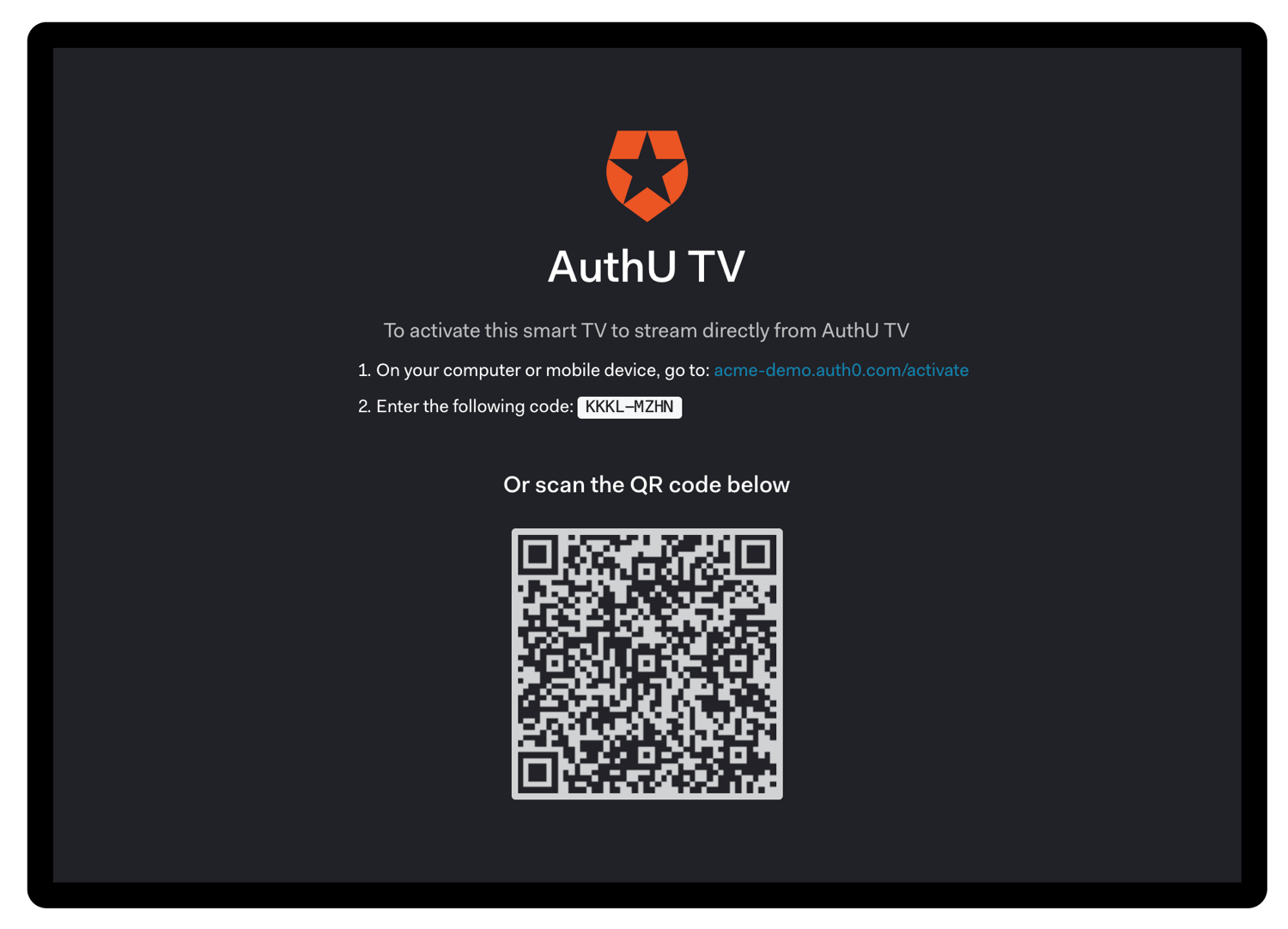 `device_code`はユーザーに直接提供するものではないため、ユーザーが混乱しないように、処理中に表示するべきではありません。
CLIをビルドする際は、この手順をスキップし、`verification_uri_complete`を使って直接ブラウザーを開くことができます。
### トークンを要求する
ユーザーがデバイスを有効にするのを待っている間に、トークンURLのポーリングを開始してアクセストークンを要求します。前のステップで抽出したポーリング間隔(`interval`)を使用して、`device_code`とともに[トークンURL](/docs/ja-jp/api/authentication#device-auth)を`POST`する必要があります。
ネットワーク遅延によるエラーを回避するには、最後のポーリング要求の応答を受信してから各間隔のカウントを開始する必要があります。
#### トークンURLに対するトークンPOST要求の例
```bash cURL theme={null}
curl --request POST \
--url 'https://{yourDomain}/oauth/token' \
--header 'content-type: application/x-www-form-urlencoded' \
--data grant_type=urn:ietf:params:oauth:grant-type:device_code \
--data 'device_code={yourDeviceCode}' \
--data 'client_id={yourClientId}'
```
```csharp C# theme={null}
var client = new RestClient("https://{yourDomain}/oauth/token");
var request = new RestRequest(Method.POST);
request.AddHeader("content-type", "application/x-www-form-urlencoded");
request.AddParameter("application/x-www-form-urlencoded", "grant_type=urn%3Aietf%3Aparams%3Aoauth%3Agrant-type%3Adevice_code&device_code=%7ByourDeviceCode%7D&client_id={yourClientId}", ParameterType.RequestBody);
IRestResponse response = client.Execute(request);
```
```go Go theme={null}
package main
import (
"fmt"
"strings"
"net/http"
"io/ioutil"
)
func main() {
url := "https://{yourDomain}/oauth/token"
payload := strings.NewReader("grant_type=urn%3Aietf%3Aparams%3Aoauth%3Agrant-type%3Adevice_code&device_code=%7ByourDeviceCode%7D&client_id={yourClientId}")
req, _ := http.NewRequest("POST", url, payload)
req.Header.Add("content-type", "application/x-www-form-urlencoded")
res, _ := http.DefaultClient.Do(req)
defer res.Body.Close()
body, _ := ioutil.ReadAll(res.Body)
fmt.Println(res)
fmt.Println(string(body))
}
```
```java Java theme={null}
HttpResponse response = Unirest.post("https://{yourDomain}/oauth/token")
.header("content-type", "application/x-www-form-urlencoded")
.body("grant_type=urn%3Aietf%3Aparams%3Aoauth%3Agrant-type%3Adevice_code&device_code=%7ByourDeviceCode%7D&client_id={yourClientId}")
.asString();
```
```javascript Node.JS theme={null}
var axios = require("axios").default;
var options = {
method: 'POST',
url: 'https://{yourDomain}/oauth/token',
headers: {'content-type': 'application/x-www-form-urlencoded'},
data: new URLSearchParams({
grant_type: 'urn:ietf:params:oauth:grant-type:device_code',
device_code: '{yourDeviceCode}',
client_id: '{yourClientId}'
})
};
axios.request(options).then(function (response) {
console.log(response.data);
}).catch(function (error) {
console.error(error);
});
```
```objc Obj-C theme={null}
#import
NSDictionary *headers = @{ @"content-type": @"application/x-www-form-urlencoded" };
NSMutableData *postData = [[NSMutableData alloc] initWithData:[@"grant_type=urn:ietf:params:oauth:grant-type:device_code" dataUsingEncoding:NSUTF8StringEncoding]];
[postData appendData:[@"&device_code={yourDeviceCode}" dataUsingEncoding:NSUTF8StringEncoding]];
[postData appendData:[@"&client_id={yourClientId}" dataUsingEncoding:NSUTF8StringEncoding]];
NSMutableURLRequest *request = [NSMutableURLRequest requestWithURL:[NSURL URLWithString:@"https://{yourDomain}/oauth/token"]
cachePolicy:NSURLRequestUseProtocolCachePolicy
timeoutInterval:10.0];
[request setHTTPMethod:@"POST"];
[request setAllHTTPHeaderFields:headers];
[request setHTTPBody:postData];
NSURLSession *session = [NSURLSession sharedSession];
NSURLSessionDataTask *dataTask = [session dataTaskWithRequest:request
completionHandler:^(NSData *data, NSURLResponse *response, NSError *error) {
if (error) {
NSLog(@"%@", error);
} else {
NSHTTPURLResponse *httpResponse = (NSHTTPURLResponse *) response;
NSLog(@"%@", httpResponse);
}
}];
[dataTask resume];
```
```php PHP theme={null}
$curl = curl_init();
curl_setopt_array($curl, [
CURLOPT_URL => "https://{yourDomain}/oauth/token",
CURLOPT_RETURNTRANSFER => true,
CURLOPT_ENCODING => "",
CURLOPT_MAXREDIRS => 10,
CURLOPT_TIMEOUT => 30,
CURLOPT_HTTP_VERSION => CURL_HTTP_VERSION_1_1,
CURLOPT_CUSTOMREQUEST => "POST",
CURLOPT_POSTFIELDS => "grant_type=urn%3Aietf%3Aparams%3Aoauth%3Agrant-type%3Adevice_code&device_code=%7ByourDeviceCode%7D&client_id={yourClientId}",
CURLOPT_HTTPHEADER => [
"content-type: application/x-www-form-urlencoded"
],
]);
$response = curl_exec($curl);
$err = curl_error($curl);
curl_close($curl);
if ($err) {
echo "cURL Error #:" . $err;
} else {
echo $response;
}
```
```python Python theme={null}
import http.client
conn = http.client.HTTPSConnection("")
payload = "grant_type=urn%3Aietf%3Aparams%3Aoauth%3Agrant-type%3Adevice_code&device_code=%7ByourDeviceCode%7D&client_id={yourClientId}"
headers = { 'content-type': "application/x-www-form-urlencoded" }
conn.request("POST", "/{yourDomain}/oauth/token", payload, headers)
res = conn.getresponse()
data = res.read()
print(data.decode("utf-8"))
```
```ruby Ruby theme={null}
require 'uri'
require 'net/http'
require 'openssl'
url = URI("https://{yourDomain}/oauth/token")
http = Net::HTTP.new(url.host, url.port)
http.use_ssl = true
http.verify_mode = OpenSSL::SSL::VERIFY_NONE
request = Net::HTTP::Post.new(url)
request["content-type"] = 'application/x-www-form-urlencoded'
request.body = "grant_type=urn%3Aietf%3Aparams%3Aoauth%3Agrant-type%3Adevice_code&device_code=%7ByourDeviceCode%7D&client_id={yourClientId}"
response = http.request(request)
puts response.read_body
```
```swift Swift theme={null}
import Foundation
let headers = ["content-type": "application/x-www-form-urlencoded"]
let postData = NSMutableData(data: "grant_type=urn:ietf:params:oauth:grant-type:device_code".data(using: String.Encoding.utf8)!)
postData.append("&device_code={yourDeviceCode}".data(using: String.Encoding.utf8)!)
postData.append("&client_id={yourClientId}".data(using: String.Encoding.utf8)!)
let request = NSMutableURLRequest(url: NSURL(string: "https://{yourDomain}/oauth/token")! as URL,
cachePolicy: .useProtocolCachePolicy,
timeoutInterval: 10.0)
request.httpMethod = "POST"
request.allHTTPHeaderFields = headers
request.httpBody = postData as Data
let session = URLSession.shared
let dataTask = session.dataTask(with: request as URLRequest, completionHandler: { (data, response, error) -> Void in
if (error != nil) {
print(error)
} else {
let httpResponse = response as? HTTPURLResponse
print(httpResponse)
}
})
dataTask.resume()
```
##### トークン要求のパラメーター
| パラメーター名 | 説明 |
| ------------- | -------------------------------------------------------------------------------------------------------------------------------------------------------------------- |
| `grant_type` | これを"urn:ietf:params:oauth:grant-type:device\_code"に設定します。これは、拡張付与タイプ([RFC6749](https://tools.ietf.org/html/rfc6749#section-4.5)のセクション4.5で定義)です。URLエンコードされている必要があります。 |
| `device_code` | このチュートリアルの前のステップで取得された`device_code`。 |
| `client_id` | アプリケーションのクライアントID。この値は[アプリケーション設定](https://manage.auth0.com/#/Applications/\{yourClientId}/settings)で確認できます。 |
#### トークンの応答
ユーザーがデバイスを認可するのを待っている間に、いくつかの異なる`HTTP 4xx`応答を受け取る場合があります。
##### 認可待ち
このエラーは、ユーザーの操作を待っている間に表示されます。このチュートリアルの前の手順で推奨されているintervalを使ってポーリングを継続してください。
```json lines theme={null}
HTTP/1.1 403 Forbidden
{
"error": "authorization_pending",
"error_description": "..."
}
```
##### 減速
ポーリングが速すぎます。このチュートリアルの前の手順で推奨されている間隔を使ってポーリングしてください。ネットワーク遅延が原因でこのエラーを受け取ることを避けるには、ポーリング要求の応答を受け取ってから間隔をカウントし始めるようにします。
```json lines theme={null}
HTTP/1.1 429 Too Many Requests
{
"error": "slow_down",
"error_description": "..."
}
```
##### 有効期限切れのトークン
ユーザーがデバイスをすぐに認可しなかったため、「device\_code」の有効期限が切れました。アプリケーションはユーザーにフローの失効を通知して、フローをもう一度始めるように促す必要があります。
`expired_token`エラーは1回だけ返されます。その後、`invalid_grant`が返されます。お使いのデバイスがポーリングを**停止しなければなりません** 。
```json lines theme={null}
HTTP/1.1 403 Bad Request
{
"error": "expired_token",
"error_description": "..."
}
```
##### アクセスが拒否されました
最後に、アクセスが拒否された場合は、次のメッセージが表示されます。
```json lines theme={null}
HTTP/1.1 403 Forbidden
{
"error": "access_denied",
"error_description": "..."
}
```
これは、以下を含むさまざまな原因で発生します。
* ユーザーがデバイスの認可を拒否した
* 認可サーバーがトランザクションを拒否した
* 構成されたルールによってアクセスが拒否された(詳細については、「[Auth0ルール](/docs/ja-jp/customize/rules)」をお読みください)
### ユーザーを認可する
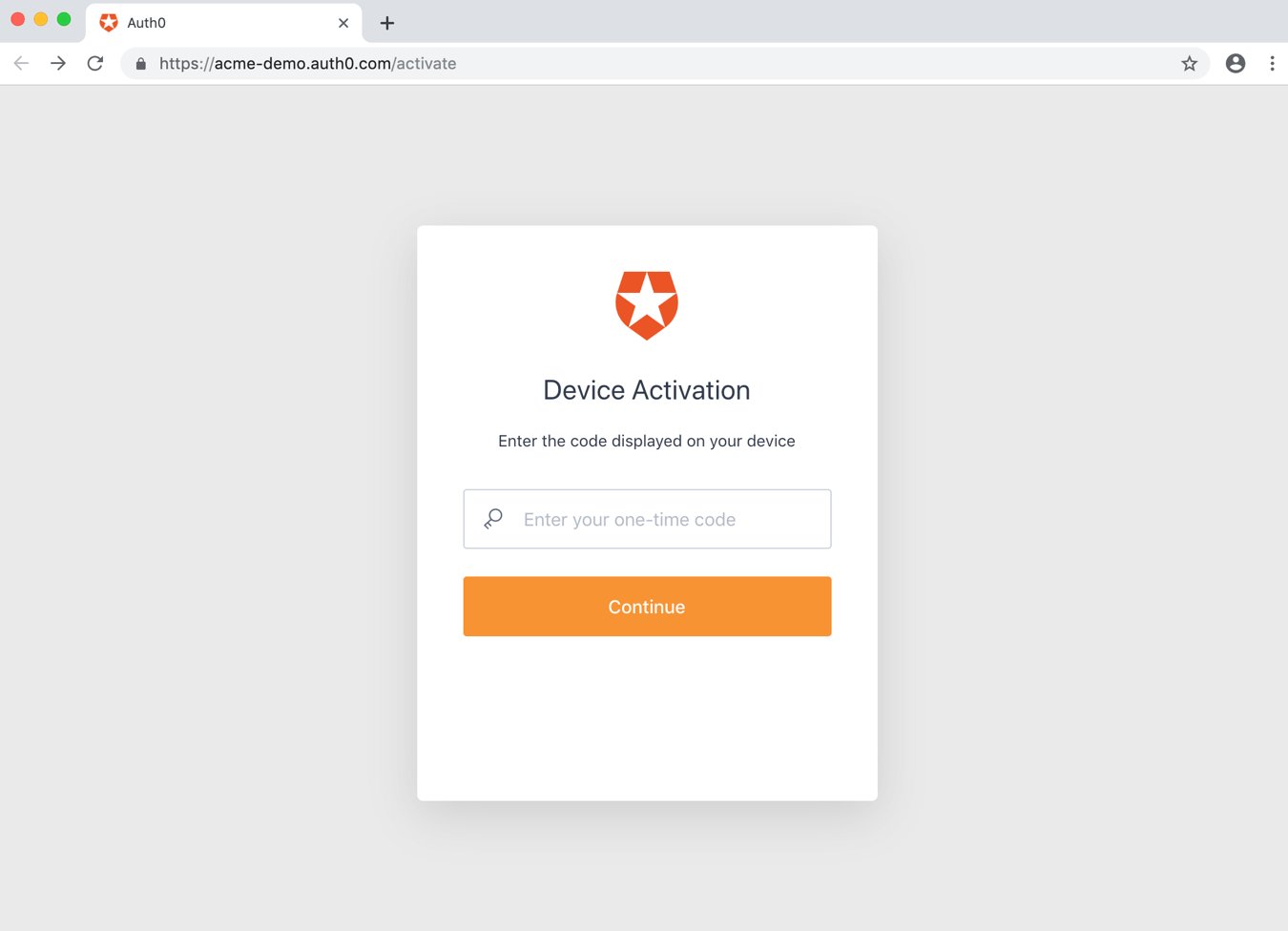
ユーザーはQRコードをスキャンするか、アクティベーションページを開いてユーザーコードを入力します:
`device_code`はユーザーに直接提供するものではないため、ユーザーが混乱しないように、処理中に表示するべきではありません。
CLIをビルドする際は、この手順をスキップし、`verification_uri_complete`を使って直接ブラウザーを開くことができます。
### トークンを要求する
ユーザーがデバイスを有効にするのを待っている間に、トークンURLのポーリングを開始してアクセストークンを要求します。前のステップで抽出したポーリング間隔(`interval`)を使用して、`device_code`とともに[トークンURL](/docs/ja-jp/api/authentication#device-auth)を`POST`する必要があります。
ネットワーク遅延によるエラーを回避するには、最後のポーリング要求の応答を受信してから各間隔のカウントを開始する必要があります。
#### トークンURLに対するトークンPOST要求の例
```bash cURL theme={null}
curl --request POST \
--url 'https://{yourDomain}/oauth/token' \
--header 'content-type: application/x-www-form-urlencoded' \
--data grant_type=urn:ietf:params:oauth:grant-type:device_code \
--data 'device_code={yourDeviceCode}' \
--data 'client_id={yourClientId}'
```
```csharp C# theme={null}
var client = new RestClient("https://{yourDomain}/oauth/token");
var request = new RestRequest(Method.POST);
request.AddHeader("content-type", "application/x-www-form-urlencoded");
request.AddParameter("application/x-www-form-urlencoded", "grant_type=urn%3Aietf%3Aparams%3Aoauth%3Agrant-type%3Adevice_code&device_code=%7ByourDeviceCode%7D&client_id={yourClientId}", ParameterType.RequestBody);
IRestResponse response = client.Execute(request);
```
```go Go theme={null}
package main
import (
"fmt"
"strings"
"net/http"
"io/ioutil"
)
func main() {
url := "https://{yourDomain}/oauth/token"
payload := strings.NewReader("grant_type=urn%3Aietf%3Aparams%3Aoauth%3Agrant-type%3Adevice_code&device_code=%7ByourDeviceCode%7D&client_id={yourClientId}")
req, _ := http.NewRequest("POST", url, payload)
req.Header.Add("content-type", "application/x-www-form-urlencoded")
res, _ := http.DefaultClient.Do(req)
defer res.Body.Close()
body, _ := ioutil.ReadAll(res.Body)
fmt.Println(res)
fmt.Println(string(body))
}
```
```java Java theme={null}
HttpResponse response = Unirest.post("https://{yourDomain}/oauth/token")
.header("content-type", "application/x-www-form-urlencoded")
.body("grant_type=urn%3Aietf%3Aparams%3Aoauth%3Agrant-type%3Adevice_code&device_code=%7ByourDeviceCode%7D&client_id={yourClientId}")
.asString();
```
```javascript Node.JS theme={null}
var axios = require("axios").default;
var options = {
method: 'POST',
url: 'https://{yourDomain}/oauth/token',
headers: {'content-type': 'application/x-www-form-urlencoded'},
data: new URLSearchParams({
grant_type: 'urn:ietf:params:oauth:grant-type:device_code',
device_code: '{yourDeviceCode}',
client_id: '{yourClientId}'
})
};
axios.request(options).then(function (response) {
console.log(response.data);
}).catch(function (error) {
console.error(error);
});
```
```objc Obj-C theme={null}
#import
NSDictionary *headers = @{ @"content-type": @"application/x-www-form-urlencoded" };
NSMutableData *postData = [[NSMutableData alloc] initWithData:[@"grant_type=urn:ietf:params:oauth:grant-type:device_code" dataUsingEncoding:NSUTF8StringEncoding]];
[postData appendData:[@"&device_code={yourDeviceCode}" dataUsingEncoding:NSUTF8StringEncoding]];
[postData appendData:[@"&client_id={yourClientId}" dataUsingEncoding:NSUTF8StringEncoding]];
NSMutableURLRequest *request = [NSMutableURLRequest requestWithURL:[NSURL URLWithString:@"https://{yourDomain}/oauth/token"]
cachePolicy:NSURLRequestUseProtocolCachePolicy
timeoutInterval:10.0];
[request setHTTPMethod:@"POST"];
[request setAllHTTPHeaderFields:headers];
[request setHTTPBody:postData];
NSURLSession *session = [NSURLSession sharedSession];
NSURLSessionDataTask *dataTask = [session dataTaskWithRequest:request
completionHandler:^(NSData *data, NSURLResponse *response, NSError *error) {
if (error) {
NSLog(@"%@", error);
} else {
NSHTTPURLResponse *httpResponse = (NSHTTPURLResponse *) response;
NSLog(@"%@", httpResponse);
}
}];
[dataTask resume];
```
```php PHP theme={null}
$curl = curl_init();
curl_setopt_array($curl, [
CURLOPT_URL => "https://{yourDomain}/oauth/token",
CURLOPT_RETURNTRANSFER => true,
CURLOPT_ENCODING => "",
CURLOPT_MAXREDIRS => 10,
CURLOPT_TIMEOUT => 30,
CURLOPT_HTTP_VERSION => CURL_HTTP_VERSION_1_1,
CURLOPT_CUSTOMREQUEST => "POST",
CURLOPT_POSTFIELDS => "grant_type=urn%3Aietf%3Aparams%3Aoauth%3Agrant-type%3Adevice_code&device_code=%7ByourDeviceCode%7D&client_id={yourClientId}",
CURLOPT_HTTPHEADER => [
"content-type: application/x-www-form-urlencoded"
],
]);
$response = curl_exec($curl);
$err = curl_error($curl);
curl_close($curl);
if ($err) {
echo "cURL Error #:" . $err;
} else {
echo $response;
}
```
```python Python theme={null}
import http.client
conn = http.client.HTTPSConnection("")
payload = "grant_type=urn%3Aietf%3Aparams%3Aoauth%3Agrant-type%3Adevice_code&device_code=%7ByourDeviceCode%7D&client_id={yourClientId}"
headers = { 'content-type': "application/x-www-form-urlencoded" }
conn.request("POST", "/{yourDomain}/oauth/token", payload, headers)
res = conn.getresponse()
data = res.read()
print(data.decode("utf-8"))
```
```ruby Ruby theme={null}
require 'uri'
require 'net/http'
require 'openssl'
url = URI("https://{yourDomain}/oauth/token")
http = Net::HTTP.new(url.host, url.port)
http.use_ssl = true
http.verify_mode = OpenSSL::SSL::VERIFY_NONE
request = Net::HTTP::Post.new(url)
request["content-type"] = 'application/x-www-form-urlencoded'
request.body = "grant_type=urn%3Aietf%3Aparams%3Aoauth%3Agrant-type%3Adevice_code&device_code=%7ByourDeviceCode%7D&client_id={yourClientId}"
response = http.request(request)
puts response.read_body
```
```swift Swift theme={null}
import Foundation
let headers = ["content-type": "application/x-www-form-urlencoded"]
let postData = NSMutableData(data: "grant_type=urn:ietf:params:oauth:grant-type:device_code".data(using: String.Encoding.utf8)!)
postData.append("&device_code={yourDeviceCode}".data(using: String.Encoding.utf8)!)
postData.append("&client_id={yourClientId}".data(using: String.Encoding.utf8)!)
let request = NSMutableURLRequest(url: NSURL(string: "https://{yourDomain}/oauth/token")! as URL,
cachePolicy: .useProtocolCachePolicy,
timeoutInterval: 10.0)
request.httpMethod = "POST"
request.allHTTPHeaderFields = headers
request.httpBody = postData as Data
let session = URLSession.shared
let dataTask = session.dataTask(with: request as URLRequest, completionHandler: { (data, response, error) -> Void in
if (error != nil) {
print(error)
} else {
let httpResponse = response as? HTTPURLResponse
print(httpResponse)
}
})
dataTask.resume()
```
##### トークン要求のパラメーター
| パラメーター名 | 説明 |
| ------------- | -------------------------------------------------------------------------------------------------------------------------------------------------------------------- |
| `grant_type` | これを"urn:ietf:params:oauth:grant-type:device\_code"に設定します。これは、拡張付与タイプ([RFC6749](https://tools.ietf.org/html/rfc6749#section-4.5)のセクション4.5で定義)です。URLエンコードされている必要があります。 |
| `device_code` | このチュートリアルの前のステップで取得された`device_code`。 |
| `client_id` | アプリケーションのクライアントID。この値は[アプリケーション設定](https://manage.auth0.com/#/Applications/\{yourClientId}/settings)で確認できます。 |
#### トークンの応答
ユーザーがデバイスを認可するのを待っている間に、いくつかの異なる`HTTP 4xx`応答を受け取る場合があります。
##### 認可待ち
このエラーは、ユーザーの操作を待っている間に表示されます。このチュートリアルの前の手順で推奨されているintervalを使ってポーリングを継続してください。
```json lines theme={null}
HTTP/1.1 403 Forbidden
{
"error": "authorization_pending",
"error_description": "..."
}
```
##### 減速
ポーリングが速すぎます。このチュートリアルの前の手順で推奨されている間隔を使ってポーリングしてください。ネットワーク遅延が原因でこのエラーを受け取ることを避けるには、ポーリング要求の応答を受け取ってから間隔をカウントし始めるようにします。
```json lines theme={null}
HTTP/1.1 429 Too Many Requests
{
"error": "slow_down",
"error_description": "..."
}
```
##### 有効期限切れのトークン
ユーザーがデバイスをすぐに認可しなかったため、「device\_code」の有効期限が切れました。アプリケーションはユーザーにフローの失効を通知して、フローをもう一度始めるように促す必要があります。
`expired_token`エラーは1回だけ返されます。その後、`invalid_grant`が返されます。お使いのデバイスがポーリングを**停止しなければなりません** 。
```json lines theme={null}
HTTP/1.1 403 Bad Request
{
"error": "expired_token",
"error_description": "..."
}
```
##### アクセスが拒否されました
最後に、アクセスが拒否された場合は、次のメッセージが表示されます。
```json lines theme={null}
HTTP/1.1 403 Forbidden
{
"error": "access_denied",
"error_description": "..."
}
```
これは、以下を含むさまざまな原因で発生します。
* ユーザーがデバイスの認可を拒否した
* 認可サーバーがトランザクションを拒否した
* 構成されたルールによってアクセスが拒否された(詳細については、「[Auth0ルール](/docs/ja-jp/customize/rules)」をお読みください)
### ユーザーを認可する
ユーザーはQRコードをスキャンするか、アクティベーションページを開いてユーザーコードを入力します:
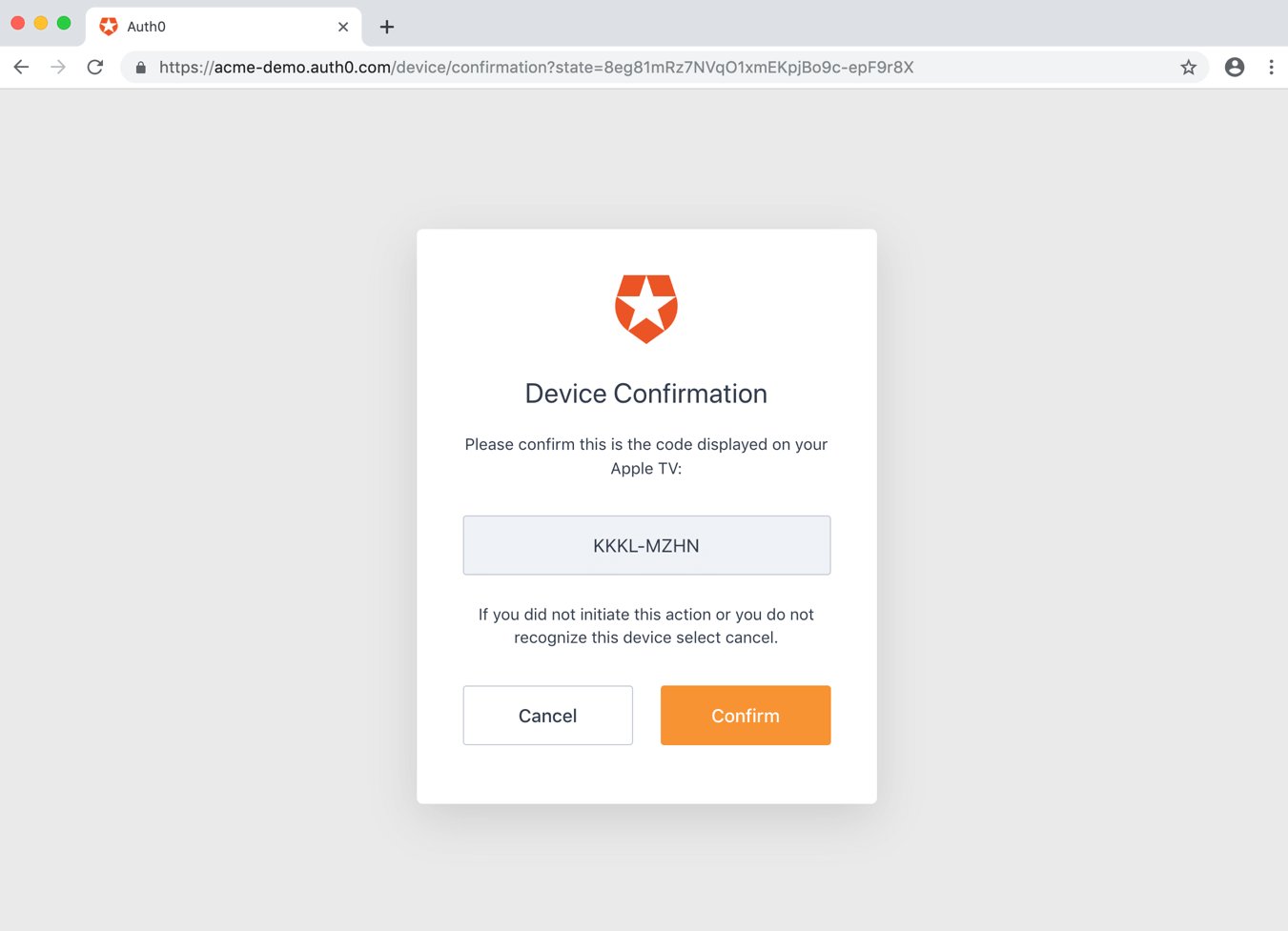
 確認ページが表示され、ユーザーが正しいデバイスであることを確認します:
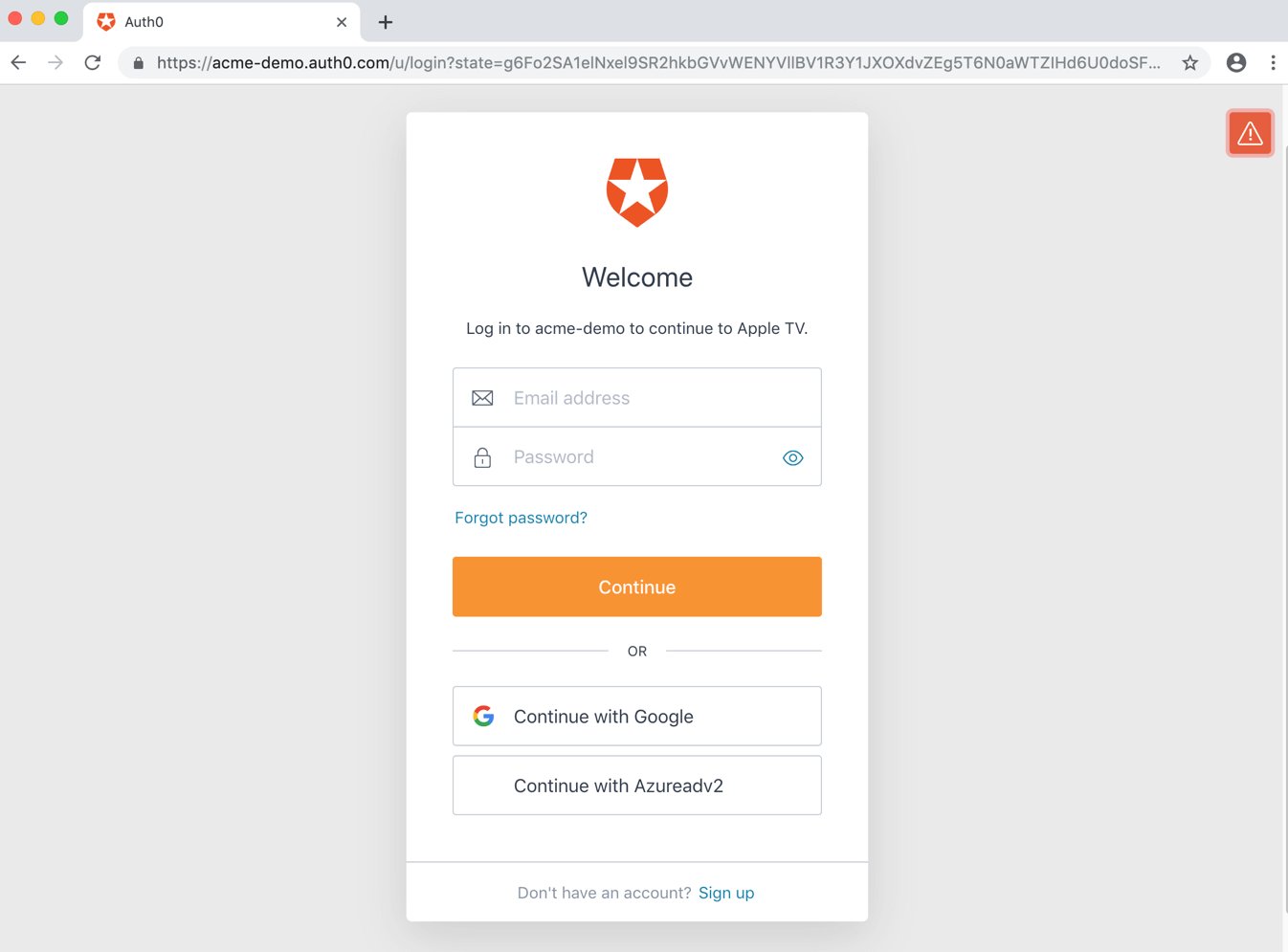
 ユーザーがサインインして、トランザクションが完了します。この手順には、以下の1つ以上のプロセスが含まれます。
* ユーザーを認証する
* 認証を行うために、ユーザーをIDプロバイダーへリダイレクトする
* アクティブなSSOセッションをチェックする
* 事前に同意が得られていない場合、デバイスに対するユーザーの同意を取得する
ユーザーがサインインして、トランザクションが完了します。この手順には、以下の1つ以上のプロセスが含まれます。
* ユーザーを認証する
* 認証を行うために、ユーザーをIDプロバイダーへリダイレクトする
* アクティブなSSOセッションをチェックする
* 事前に同意が得られていない場合、デバイスに対するユーザーの同意を取得する
 認証と同意が成功すると、確認のプロンプトが表示されます:
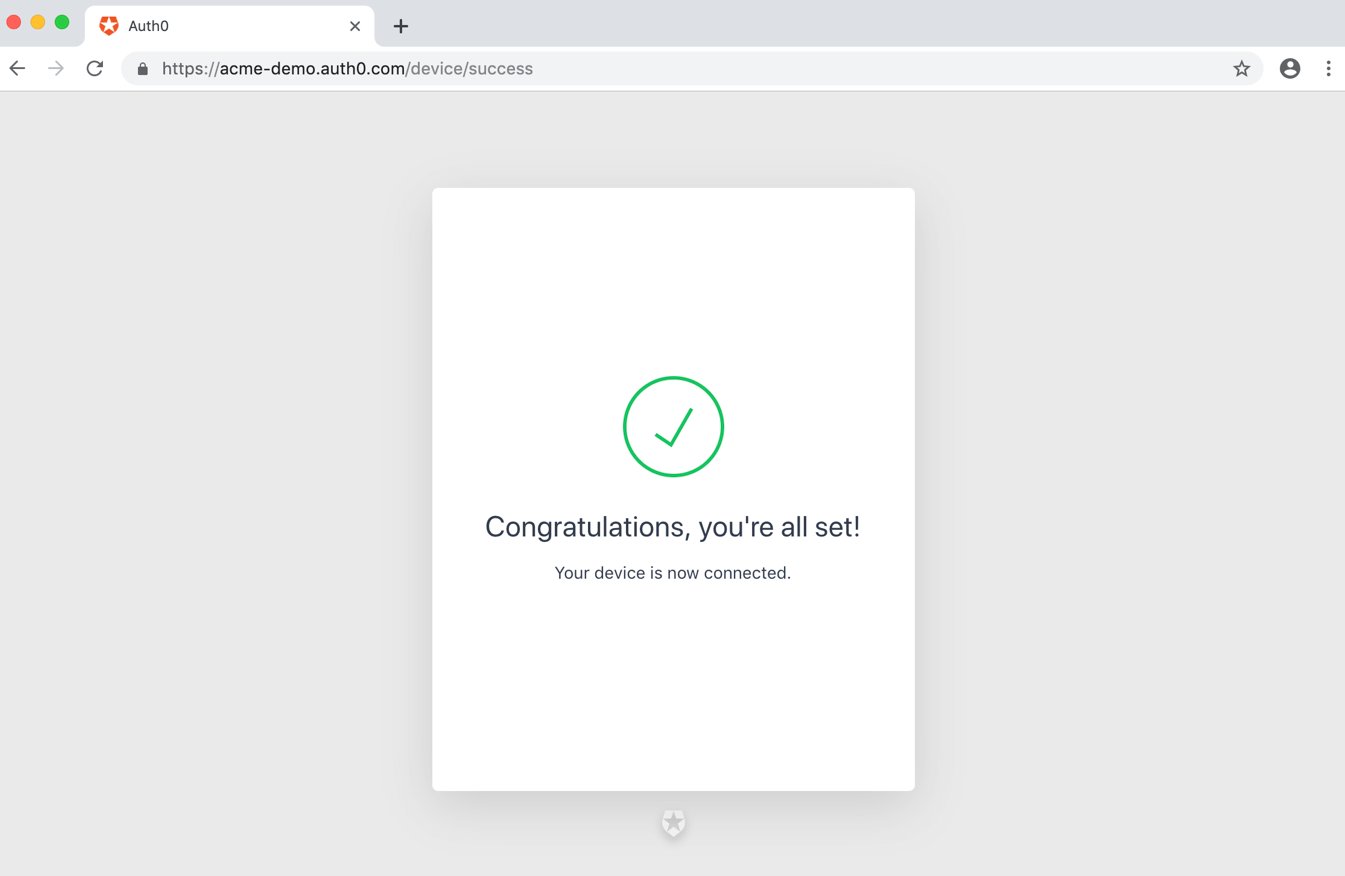 この時点で、ユーザーは認証され、デバイスは認可されています。
### トークンを受け取る
ユーザーが認証とデバイスの認可を行っている間、デバイスアプリはトークンURLをポーリングしてアクセストークンを要求し続けます。
ユーザーが正常にデバイスの認可を行った場合、`access_token`、`refresh_token`(任意)、`id_token`(任意)、`token_type`、および`expires_in`値を含むペイロードを持つ`HTTP 200`応答を受け取ります。
```json lines theme={null}
{
"access_token":"eyJz93a...k4laUWw",
"refresh_token":"GEbRxBN...edjnXbL",
"id_token": "eyJ0XAi...4faeEoQ",
"token_type":"Bearer",
"expires_in":86400
}
```
トークンは、検証してから保存します。操作方法については、「[IDトークンの検証](/docs/ja-jp/secure/tokens/id-tokens/validate-id-tokens)」および「[アクセストークンを検証する](/docs/ja-jp/secure/tokens/access-tokens/validate-access-tokens)」を参照してください。
アクセストークンは、Auth0 Authentication APIの[`/userinfo`エンドポイント](/docs/ja-jp/api/authentication#get-user-info)や他のAPIを呼び出すために使用されます(アクセストークンの詳細については、「[アクセストークン](/docs/ja-jp/secure/tokens/access-tokens)」を参照してください)。`openid`スコープを含めた場合にのみ、アクセストークンを使用して`/userinfo`を呼び出すことができます。独自のAPIを呼び出す場合に、APIがまず実行しなければならいことは、[アクセストークンを検証](/docs/ja-jp/secure/tokens/access-tokens/validate-access-tokens)することです。
IDトークンにはデコードして抽出するべきユーザー情報が含まれています(IDトークンの詳細については、「[IDトークン](/docs/ja-jp/secure/tokens/id-tokens)」をお読みください)。`id_token`は`openid`スコープを含めた場合にのみ応答で返されます。
リフレッシュトークンは、トークンの有効期限が切れた後に、新しいアクセストークンまたはIDトークンを取得するために使用されます(リフレッシュトークンの詳細については、「[リフレッシュトークン](/docs/ja-jp/secure/tokens/refresh-tokens)」をお読みください)。`refresh_token`は、`offline_access`スコープを含めて、DashboardでAPIの\*\*[Allow Offline Access(オンラインでのアクセスを許可する)]\*\* を有効にした場合にのみ応答で返されます。
リフレッシュトークンは、ユーザーが実質的に永久に認証された状態を維持できるようにするため、安全に保管しなければなりません。
### APIを呼び出す
APIを呼び出すには、アプリケーションは、取得したアクセストークンをベアラートークンとしてHTTP要求の認証ヘッダーで渡さなければなりません。
```bash cURL lines theme={null}
curl --request GET \
--url https://myapi.com/api \
--header 'authorization: Bearer ACCESS_TOKEN' \
--header 'content-type: application/json'
```
```csharp C# lines theme={null}
var client = new RestClient("https://myapi.com/api");
var request = new RestRequest(Method.GET);
request.AddHeader("content-type", "application/json");
request.AddHeader("authorization", "Bearer ACCESS_TOKEN");
IRestResponse response = client.Execute(request);
```
```go Go lines expandable theme={null}
package main
import (
"fmt"
"net/http"
"io/ioutil"
)
func main() {
url := "https://myapi.com/api"
req, _ := http.NewRequest("GET", url, nil)
req.Header.Add("content-type", "application/json")
req.Header.Add("authorization", "Bearer ACCESS_TOKEN")
res, _ := http.DefaultClient.Do(req)
defer res.Body.Close()
body, _ := ioutil.ReadAll(res.Body)
fmt.Println(res)
fmt.Println(string(body))
}
```
```java Java lines theme={null}
HttpResponse response = Unirest.get("https://myapi.com/api")
.header("content-type", "application/json")
.header("authorization", "Bearer ACCESS_TOKEN")
.asString();
```
```javascript Node.JS lines theme={null}
var axios = require("axios").default;
var options = {
method: 'GET',
url: 'https://myapi.com/api',
headers: {'content-type': 'application/json', authorization: 'Bearer ACCESS_TOKEN'}
};
axios.request(options).then(function (response) {
console.log(response.data);
}).catch(function (error) {
console.error(error);
});
```
```objc Obj-C lines theme={null}
#import
NSDictionary *headers = @{ @"content-type": @"application/json",
@"authorization": @"Bearer ACCESS_TOKEN" };
NSMutableURLRequest *request = [NSMutableURLRequest requestWithURL:[NSURL URLWithString:@"https://myapi.com/api"]
cachePolicy:NSURLRequestUseProtocolCachePolicy
timeoutInterval:10.0];
[request setHTTPMethod:@"GET"];
[request setAllHTTPHeaderFields:headers];
NSURLSession *session = [NSURLSession sharedSession];
NSURLSessionDataTask *dataTask = [session dataTaskWithRequest:request
completionHandler:^(NSData *data, NSURLResponse *response, NSError *error) {
if (error) {
NSLog(@"%@", error);
} else {
NSHTTPURLResponse *httpResponse = (NSHTTPURLResponse *) response;
NSLog(@"%@", httpResponse);
}
}];
[dataTask resume];
```
```php PHP lines expandable theme={null}
$curl = curl_init();
curl_setopt_array($curl, [
CURLOPT_URL => "https://myapi.com/api",
CURLOPT_RETURNTRANSFER => true,
CURLOPT_ENCODING => "",
CURLOPT_MAXREDIRS => 10,
CURLOPT_TIMEOUT => 30,
CURLOPT_HTTP_VERSION => CURL_HTTP_VERSION_1_1,
CURLOPT_CUSTOMREQUEST => "GET",
CURLOPT_HTTPHEADER => [
"authorization: Bearer ACCESS_TOKEN",
"content-type: application/json"
],
]);
$response = curl_exec($curl);
$err = curl_error($curl);
curl_close($curl);
if ($err) {
echo "cURL Error #:" . $err;
} else {
echo $response;
}
```
```python Python lines theme={null}
import http.client
conn = http.client.HTTPSConnection("myapi.com")
headers = {
'content-type': "application/json",
'authorization': "Bearer ACCESS_TOKEN"
}
conn.request("GET", "/api", headers=headers)
res = conn.getresponse()
data = res.read()
print(data.decode("utf-8"))
```
```ruby Ruby lines theme={null}
require 'uri'
require 'net/http'
require 'openssl'
url = URI("https://myapi.com/api")
http = Net::HTTP.new(url.host, url.port)
http.use_ssl = true
http.verify_mode = OpenSSL::SSL::VERIFY_NONE
request = Net::HTTP::Get.new(url)
request["content-type"] = 'application/json'
request["authorization"] = 'Bearer ACCESS_TOKEN'
response = http.request(request)
puts response.read_body
```
```swift Swift lines theme={null}
import Foundation
let headers = [
"content-type": "application/json",
"authorization": "Bearer ACCESS_TOKEN"
]
let request = NSMutableURLRequest(url: NSURL(string: "https://myapi.com/api")! as URL,
cachePolicy: .useProtocolCachePolicy,
timeoutInterval: 10.0)
request.httpMethod = "GET"
request.allHTTPHeaderFields = headers
let session = URLSession.shared
let dataTask = session.dataTask(with: request as URLRequest, completionHandler: { (data, response, error) -> Void in
if (error != nil) {
print(error)
} else {
let httpResponse = response as? HTTPURLResponse
print(httpResponse)
}
})
dataTask.resume()
```
### リフレッシュトークン
このチュートリアルに従って次の操作を完了している場合は、すでにリフレッシュトークンを受け取っています。
* オフラインアクセスを許可するように、APIを構成する。
* [認可エンドポイント](/docs/ja-jp/api/authentication/reference#authorize-application)を通じて認証要求を開始するときに`offline_access`スコープを含める。
リフレッシュトークンを使用して新しいアクセストークンを取得できます。通常、ユーザーが新しいアクセストークンを必要とするのは、以前のアクセストークンの有効期限が切れた後、または新しいリソースに初めてアクセスするときだけです。APIを呼び出すたびにエンドポイントを呼び出して新しいアクセストークンを取得するのは良くない慣行であり、Auth0では同じIPから同じトークンを使用して実行できるエンドポイントへの要求の量を制限するレート制限を維持しています。
トークンを更新するには、`grant_type=refresh_token`を使用して、認証APIの`/oauth/token`エンドポイントに対して`POST`要求を行います。
#### トークンURLに対するリフレッシュトークンのPOST要求の例
```bash cURL theme={null}
curl --request POST \
--url 'https://{yourDomain}/oauth/token' \
--header 'content-type: application/x-www-form-urlencoded' \
--data grant_type=refresh_token \
--data 'client_id={yourClientId}' \
--data 'client_secret={yourClientSecret}' \
--data 'refresh_token={yourRefreshToken}'
```
```csharp C# theme={null}
var client = new RestClient("https://{yourDomain}/oauth/token");
var request = new RestRequest(Method.POST);
request.AddHeader("content-type", "application/x-www-form-urlencoded");
request.AddParameter("application/x-www-form-urlencoded", "grant_type=refresh_token&client_id={yourClientId}&client_secret={yourClientSecret}&refresh_token=%7ByourRefreshToken%7D", ParameterType.RequestBody);
IRestResponse response = client.Execute(request);
```
```go Go theme={null}
package main
import (
"fmt"
"strings"
"net/http"
"io/ioutil"
)
func main() {
url := "https://{yourDomain}/oauth/token"
payload := strings.NewReader("grant_type=refresh_token&client_id={yourClientId}&client_secret={yourClientSecret}&refresh_token=%7ByourRefreshToken%7D")
req, _ := http.NewRequest("POST", url, payload)
req.Header.Add("content-type", "application/x-www-form-urlencoded")
res, _ := http.DefaultClient.Do(req)
defer res.Body.Close()
body, _ := ioutil.ReadAll(res.Body)
fmt.Println(res)
fmt.Println(string(body))
}
```
```java Java theme={null}
HttpResponse response = Unirest.post("https://{yourDomain}/oauth/token")
.header("content-type", "application/x-www-form-urlencoded")
.body("grant_type=refresh_token&client_id={yourClientId}&client_secret={yourClientSecret}&refresh_token=%7ByourRefreshToken%7D")
.asString();
```
```javascript Node.JS theme={null}
var axios = require("axios").default;
var options = {
method: 'POST',
url: 'https://{yourDomain}/oauth/token',
headers: {'content-type': 'application/x-www-form-urlencoded'},
data: new URLSearchParams({
grant_type: 'refresh_token',
client_id: '{yourClientId}',
client_secret: '{yourClientSecret}',
refresh_token: '{yourRefreshToken}'
})
};
axios.request(options).then(function (response) {
console.log(response.data);
}).catch(function (error) {
console.error(error);
});
```
```objc Obj-C theme={null}
#import
NSDictionary *headers = @{ @"content-type": @"application/x-www-form-urlencoded" };
NSMutableData *postData = [[NSMutableData alloc] initWithData:[@"grant_type=refresh_token" dataUsingEncoding:NSUTF8StringEncoding]];
[postData appendData:[@"&client_id={yourClientId}" dataUsingEncoding:NSUTF8StringEncoding]];
[postData appendData:[@"&client_secret={yourClientSecret}" dataUsingEncoding:NSUTF8StringEncoding]];
[postData appendData:[@"&refresh_token={yourRefreshToken}" dataUsingEncoding:NSUTF8StringEncoding]];
NSMutableURLRequest *request = [NSMutableURLRequest requestWithURL:[NSURL URLWithString:@"https://{yourDomain}/oauth/token"]
cachePolicy:NSURLRequestUseProtocolCachePolicy
timeoutInterval:10.0];
[request setHTTPMethod:@"POST"];
[request setAllHTTPHeaderFields:headers];
[request setHTTPBody:postData];
NSURLSession *session = [NSURLSession sharedSession];
NSURLSessionDataTask *dataTask = [session dataTaskWithRequest:request
completionHandler:^(NSData *data, NSURLResponse *response, NSError *error) {
if (error) {
NSLog(@"%@", error);
} else {
NSHTTPURLResponse *httpResponse = (NSHTTPURLResponse *) response;
NSLog(@"%@", httpResponse);
}
}];
[dataTask resume];
```
```php PHP theme={null}
$curl = curl_init();
curl_setopt_array($curl, [
CURLOPT_URL => "https://{yourDomain}/oauth/token",
CURLOPT_RETURNTRANSFER => true,
CURLOPT_ENCODING => "",
CURLOPT_MAXREDIRS => 10,
CURLOPT_TIMEOUT => 30,
CURLOPT_HTTP_VERSION => CURL_HTTP_VERSION_1_1,
CURLOPT_CUSTOMREQUEST => "POST",
CURLOPT_POSTFIELDS => "grant_type=refresh_token&client_id={yourClientId}&client_secret={yourClientSecret}&refresh_token=%7ByourRefreshToken%7D",
CURLOPT_HTTPHEADER => [
"content-type: application/x-www-form-urlencoded"
],
]);
$response = curl_exec($curl);
$err = curl_error($curl);
curl_close($curl);
if ($err) {
echo "cURL Error #:" . $err;
} else {
echo $response;
}
```
```python Python theme={null}
import http.client
conn = http.client.HTTPSConnection("")
payload = "grant_type=refresh_token&client_id={yourClientId}&client_secret={yourClientSecret}&refresh_token=%7ByourRefreshToken%7D"
headers = { 'content-type': "application/x-www-form-urlencoded" }
conn.request("POST", "/{yourDomain}/oauth/token", payload, headers)
res = conn.getresponse()
data = res.read()
print(data.decode("utf-8"))
```
```ruby Ruby theme={null}
require 'uri'
require 'net/http'
require 'openssl'
url = URI("https://{yourDomain}/oauth/token")
http = Net::HTTP.new(url.host, url.port)
http.use_ssl = true
http.verify_mode = OpenSSL::SSL::VERIFY_NONE
request = Net::HTTP::Post.new(url)
request["content-type"] = 'application/x-www-form-urlencoded'
request.body = "grant_type=refresh_token&client_id={yourClientId}&client_secret={yourClientSecret}&refresh_token=%7ByourRefreshToken%7D"
response = http.request(request)
puts response.read_body
```
```swift Swift theme={null}
import Foundation
let headers = ["content-type": "application/x-www-form-urlencoded"]
let postData = NSMutableData(data: "grant_type=refresh_token".data(using: String.Encoding.utf8)!)
postData.append("&client_id={yourClientId}".data(using: String.Encoding.utf8)!)
postData.append("&client_secret={yourClientSecret}".data(using: String.Encoding.utf8)!)
postData.append("&refresh_token={yourRefreshToken}".data(using: String.Encoding.utf8)!)
let request = NSMutableURLRequest(url: NSURL(string: "https://{yourDomain}/oauth/token")! as URL,
cachePolicy: .useProtocolCachePolicy,
timeoutInterval: 10.0)
request.httpMethod = "POST"
request.allHTTPHeaderFields = headers
request.httpBody = postData as Data
let session = URLSession.shared
let dataTask = session.dataTask(with: request as URLRequest, completionHandler: { (data, response, error) -> Void in
if (error != nil) {
print(error)
} else {
let httpResponse = response as? HTTPURLResponse
print(httpResponse)
}
})
dataTask.resume()
```
##### リフレッシュトークン要求パラメーター
| パラメーター | 説明 |
| --------------- | --------------------------------------------------------------------------------------------------------------------------------------------- |
| `grant_type` | これを"refresh\_token"に設定します。 |
| `client_id` | アプリケーションのクライアントIDです。この値は[[Application Settings(アプリケーションの設定)]](https://manage.auth0.com/#/Applications/\{yourClientId}/settings)にあります。 |
| `client_secret` | アプリケーションのクライアントシークレットでし。この値は[[Application Settings(アプリケーションの設定)]](https://manage.auth0.com/#/Applications/\{yourClientSecret}/settings)にあります。 |
| `refresh_token` | 使用するリフレッシュトークンです。 |
| `scope` | (任意)要求された権限スコープのスペース区切りのリストです。送信されない場合は、元のスコープが使用されます。それ以外の場合は、スコープの数を減らして要求できます。URLエンコードが必要です。 |
#### リフレッシュトークンの応答
すべてがうまくいけば、`HTTP 200`応答がペイロードに新しい`access_token`、`id_token`(任意)、秒単位のトークン有効期間(`expires_in`)、付与された`scope`の値、`token_type`を含めて返されます。
```json lines theme={null}
{
"access_token": "eyJ...MoQ",
"expires_in": 86400,
"scope": "openid offline_access",
"id_token": "eyJ...0NE",
"token_type": "Bearer"
}
```
トークンは、検証してから保存します。操作方法については、「[IDトークンの検証](/docs/ja-jp/secure/tokens/id-tokens/validate-id-tokens)」および「[アクセストークンを検証する](/docs/ja-jp/secure/tokens/access-tokens/validate-access-tokens)」を参照してください。
## サンプルユースケース
### デバイス認可フローの使用を検出する
ルールを使用して、現在のトランザクションがデバイス認可フローを使用しているかを検出できます(ルールの詳細については、「[Auth0ルール](/docs/ja-jp/customize/rules)」をお読みください)。これを行うには、`context`オブジェクトの`protocol`プロパティを確認します。
```javascript lines theme={null}
function (user, context, callback) {
if (context.protocol === 'oauth2-device-code') {
...
}
callback(null, user, context);
}
```
### 実装例
* [デバイス認可プレイグラウンド](https://auth0.github.io/device-flow-playground/)
* [AppleTV(Swift)](https://github.com/pushpabrol/auth0-device-flow-appletv):AppleTVからのデバイス認可フローにAuth0を使用できることを示す簡素なアプリケーションです。
* [CLI(Node.js)](https://gist.github.com/panva/ebaacfe433a8677bdbf458f6e1132045):認可コードフローではなく、デバイス認可フローを使用するCLIの実装例です。CLIではWebサーバーをホストしてポートを待ち受ける必要がない点で大きく異なります。
## トラブルシューティング
テナントログは実行されるあらゆるやり取りを記録するため、問題の解決に利用できます。詳細については、「[ログ](/docs/ja-jp/deploy-monitor/logs)」をお読みください。
### エラーコード
| コード | 名前 | 説明 |
| ------- | ----------------- | ---------------- |
| `fdeaz` | デバイス認可要求の失敗 | |
| `fdeac` | デバイス有効化の失敗 | |
| `fdecc` | ユーザーがデバイス確認をキャンセル | |
| `fede` | 交換の失敗 | アクセストークンのデバイスコード |
| `sede` | 交換の成功 | アクセストークンのデバイスコード |
### 制限事項
デバイス認可フローを使用するには、デバイスが次の要件を満たす必要があります。
* [カスタムドメイン](/docs/ja-jp/customize/custom-domains)の使用にServer Name Indication(SNI)をサポートしている
* [Auth0アプリケーションタイプ](/docs/ja-jp/get-started/applications)が **[Native(ネイティブ)]** である
* [トークンエンドポイントの認証方法](/docs/ja-jp/get-started/applications/application-settings)が **[None(なし)]** に設定されている
* [OIDCに準拠](/docs/ja-jp/get-started/applications/application-settings)している
* [動的クライアント登録(Dynamic Client Registration)](/docs/ja-jp/get-started/applications/dynamic-client-registration)で作成されていない
また、デバイス認可フローでは以下を実行できません:
* [ソーシャル接続](/docs/ja-jp/authenticate/identity-providers/social-identity-providers)に[Auth0開発者キー](/docs/ja-jp/authenticate/identity-providers/social-identity-providers/devkeys)を使用する([ユニバーサルログインエクスペリエンス](/docs/ja-jp/authenticate/login/auth0-universal-login/universal-login-vs-classic-login/universal-experience)を使用していない場合)
* クエリ文字列パラメーターへのアクセスをホスト済みのログインページまたはルールから行う
* [ユーザーアカウントをリンクする](/docs/ja-jp/manage-users/user-accounts/user-account-linking)
機密クライアント以外では、Draft 15に完全に対応しています。詳細については、[ietf.orgにあるOAuth 2.0 Device Authorization GrantのDraft 15](https://tools.ietf.org/html/draft-ietf-oauth-device-flow-15)をお読みください。
## もっと詳しく
* [OAuth 2.0の認可フレームワーク](/docs/ja-jp/authenticate/protocols/oauth)
* [OpenID Connectのプロトコル](/docs/ja-jp/authenticate/protocols/openid-connect-protocol)
* [トークン](/docs/ja-jp/secure/tokens)
* [ログ](/docs/ja-jp/deploy-monitor/logs)
この時点で、ユーザーは認証され、デバイスは認可されています。
### トークンを受け取る
ユーザーが認証とデバイスの認可を行っている間、デバイスアプリはトークンURLをポーリングしてアクセストークンを要求し続けます。
ユーザーが正常にデバイスの認可を行った場合、`access_token`、`refresh_token`(任意)、`id_token`(任意)、`token_type`、および`expires_in`値を含むペイロードを持つ`HTTP 200`応答を受け取ります。
```json lines theme={null}
{
"access_token":"eyJz93a...k4laUWw",
"refresh_token":"GEbRxBN...edjnXbL",
"id_token": "eyJ0XAi...4faeEoQ",
"token_type":"Bearer",
"expires_in":86400
}
```
トークンは、検証してから保存します。操作方法については、「[IDトークンの検証](/docs/ja-jp/secure/tokens/id-tokens/validate-id-tokens)」および「[アクセストークンを検証する](/docs/ja-jp/secure/tokens/access-tokens/validate-access-tokens)」を参照してください。
アクセストークンは、Auth0 Authentication APIの[`/userinfo`エンドポイント](/docs/ja-jp/api/authentication#get-user-info)や他のAPIを呼び出すために使用されます(アクセストークンの詳細については、「[アクセストークン](/docs/ja-jp/secure/tokens/access-tokens)」を参照してください)。`openid`スコープを含めた場合にのみ、アクセストークンを使用して`/userinfo`を呼び出すことができます。独自のAPIを呼び出す場合に、APIがまず実行しなければならいことは、[アクセストークンを検証](/docs/ja-jp/secure/tokens/access-tokens/validate-access-tokens)することです。
IDトークンにはデコードして抽出するべきユーザー情報が含まれています(IDトークンの詳細については、「[IDトークン](/docs/ja-jp/secure/tokens/id-tokens)」をお読みください)。`id_token`は`openid`スコープを含めた場合にのみ応答で返されます。
リフレッシュトークンは、トークンの有効期限が切れた後に、新しいアクセストークンまたはIDトークンを取得するために使用されます(リフレッシュトークンの詳細については、「[リフレッシュトークン](/docs/ja-jp/secure/tokens/refresh-tokens)」をお読みください)。`refresh_token`は、`offline_access`スコープを含めて、DashboardでAPIの\*\*[Allow Offline Access(オンラインでのアクセスを許可する)]\*\* を有効にした場合にのみ応答で返されます。
リフレッシュトークンは、ユーザーが実質的に永久に認証された状態を維持できるようにするため、安全に保管しなければなりません。
### APIを呼び出す
APIを呼び出すには、アプリケーションは、取得したアクセストークンをベアラートークンとしてHTTP要求の認証ヘッダーで渡さなければなりません。
```bash cURL lines theme={null}
curl --request GET \
--url https://myapi.com/api \
--header 'authorization: Bearer ACCESS_TOKEN' \
--header 'content-type: application/json'
```
```csharp C# lines theme={null}
var client = new RestClient("https://myapi.com/api");
var request = new RestRequest(Method.GET);
request.AddHeader("content-type", "application/json");
request.AddHeader("authorization", "Bearer ACCESS_TOKEN");
IRestResponse response = client.Execute(request);
```
```go Go lines expandable theme={null}
package main
import (
"fmt"
"net/http"
"io/ioutil"
)
func main() {
url := "https://myapi.com/api"
req, _ := http.NewRequest("GET", url, nil)
req.Header.Add("content-type", "application/json")
req.Header.Add("authorization", "Bearer ACCESS_TOKEN")
res, _ := http.DefaultClient.Do(req)
defer res.Body.Close()
body, _ := ioutil.ReadAll(res.Body)
fmt.Println(res)
fmt.Println(string(body))
}
```
```java Java lines theme={null}
HttpResponse response = Unirest.get("https://myapi.com/api")
.header("content-type", "application/json")
.header("authorization", "Bearer ACCESS_TOKEN")
.asString();
```
```javascript Node.JS lines theme={null}
var axios = require("axios").default;
var options = {
method: 'GET',
url: 'https://myapi.com/api',
headers: {'content-type': 'application/json', authorization: 'Bearer ACCESS_TOKEN'}
};
axios.request(options).then(function (response) {
console.log(response.data);
}).catch(function (error) {
console.error(error);
});
```
```objc Obj-C lines theme={null}
#import
NSDictionary *headers = @{ @"content-type": @"application/json",
@"authorization": @"Bearer ACCESS_TOKEN" };
NSMutableURLRequest *request = [NSMutableURLRequest requestWithURL:[NSURL URLWithString:@"https://myapi.com/api"]
cachePolicy:NSURLRequestUseProtocolCachePolicy
timeoutInterval:10.0];
[request setHTTPMethod:@"GET"];
[request setAllHTTPHeaderFields:headers];
NSURLSession *session = [NSURLSession sharedSession];
NSURLSessionDataTask *dataTask = [session dataTaskWithRequest:request
completionHandler:^(NSData *data, NSURLResponse *response, NSError *error) {
if (error) {
NSLog(@"%@", error);
} else {
NSHTTPURLResponse *httpResponse = (NSHTTPURLResponse *) response;
NSLog(@"%@", httpResponse);
}
}];
[dataTask resume];
```
```php PHP lines expandable theme={null}
$curl = curl_init();
curl_setopt_array($curl, [
CURLOPT_URL => "https://myapi.com/api",
CURLOPT_RETURNTRANSFER => true,
CURLOPT_ENCODING => "",
CURLOPT_MAXREDIRS => 10,
CURLOPT_TIMEOUT => 30,
CURLOPT_HTTP_VERSION => CURL_HTTP_VERSION_1_1,
CURLOPT_CUSTOMREQUEST => "GET",
CURLOPT_HTTPHEADER => [
"authorization: Bearer ACCESS_TOKEN",
"content-type: application/json"
],
]);
$response = curl_exec($curl);
$err = curl_error($curl);
curl_close($curl);
if ($err) {
echo "cURL Error #:" . $err;
} else {
echo $response;
}
```
```python Python lines theme={null}
import http.client
conn = http.client.HTTPSConnection("myapi.com")
headers = {
'content-type': "application/json",
'authorization': "Bearer ACCESS_TOKEN"
}
conn.request("GET", "/api", headers=headers)
res = conn.getresponse()
data = res.read()
print(data.decode("utf-8"))
```
```ruby Ruby lines theme={null}
require 'uri'
require 'net/http'
require 'openssl'
url = URI("https://myapi.com/api")
http = Net::HTTP.new(url.host, url.port)
http.use_ssl = true
http.verify_mode = OpenSSL::SSL::VERIFY_NONE
request = Net::HTTP::Get.new(url)
request["content-type"] = 'application/json'
request["authorization"] = 'Bearer ACCESS_TOKEN'
response = http.request(request)
puts response.read_body
```
```swift Swift lines theme={null}
import Foundation
let headers = [
"content-type": "application/json",
"authorization": "Bearer ACCESS_TOKEN"
]
let request = NSMutableURLRequest(url: NSURL(string: "https://myapi.com/api")! as URL,
cachePolicy: .useProtocolCachePolicy,
timeoutInterval: 10.0)
request.httpMethod = "GET"
request.allHTTPHeaderFields = headers
let session = URLSession.shared
let dataTask = session.dataTask(with: request as URLRequest, completionHandler: { (data, response, error) -> Void in
if (error != nil) {
print(error)
} else {
let httpResponse = response as? HTTPURLResponse
print(httpResponse)
}
})
dataTask.resume()
```
### リフレッシュトークン
このチュートリアルに従って次の操作を完了している場合は、すでにリフレッシュトークンを受け取っています。
* オフラインアクセスを許可するように、APIを構成する。
* [認可エンドポイント](/docs/ja-jp/api/authentication/reference#authorize-application)を通じて認証要求を開始するときに`offline_access`スコープを含める。
リフレッシュトークンを使用して新しいアクセストークンを取得できます。通常、ユーザーが新しいアクセストークンを必要とするのは、以前のアクセストークンの有効期限が切れた後、または新しいリソースに初めてアクセスするときだけです。APIを呼び出すたびにエンドポイントを呼び出して新しいアクセストークンを取得するのは良くない慣行であり、Auth0では同じIPから同じトークンを使用して実行できるエンドポイントへの要求の量を制限するレート制限を維持しています。
トークンを更新するには、`grant_type=refresh_token`を使用して、認証APIの`/oauth/token`エンドポイントに対して`POST`要求を行います。
#### トークンURLに対するリフレッシュトークンのPOST要求の例
```bash cURL theme={null}
curl --request POST \
--url 'https://{yourDomain}/oauth/token' \
--header 'content-type: application/x-www-form-urlencoded' \
--data grant_type=refresh_token \
--data 'client_id={yourClientId}' \
--data 'client_secret={yourClientSecret}' \
--data 'refresh_token={yourRefreshToken}'
```
```csharp C# theme={null}
var client = new RestClient("https://{yourDomain}/oauth/token");
var request = new RestRequest(Method.POST);
request.AddHeader("content-type", "application/x-www-form-urlencoded");
request.AddParameter("application/x-www-form-urlencoded", "grant_type=refresh_token&client_id={yourClientId}&client_secret={yourClientSecret}&refresh_token=%7ByourRefreshToken%7D", ParameterType.RequestBody);
IRestResponse response = client.Execute(request);
```
```go Go theme={null}
package main
import (
"fmt"
"strings"
"net/http"
"io/ioutil"
)
func main() {
url := "https://{yourDomain}/oauth/token"
payload := strings.NewReader("grant_type=refresh_token&client_id={yourClientId}&client_secret={yourClientSecret}&refresh_token=%7ByourRefreshToken%7D")
req, _ := http.NewRequest("POST", url, payload)
req.Header.Add("content-type", "application/x-www-form-urlencoded")
res, _ := http.DefaultClient.Do(req)
defer res.Body.Close()
body, _ := ioutil.ReadAll(res.Body)
fmt.Println(res)
fmt.Println(string(body))
}
```
```java Java theme={null}
HttpResponse response = Unirest.post("https://{yourDomain}/oauth/token")
.header("content-type", "application/x-www-form-urlencoded")
.body("grant_type=refresh_token&client_id={yourClientId}&client_secret={yourClientSecret}&refresh_token=%7ByourRefreshToken%7D")
.asString();
```
```javascript Node.JS theme={null}
var axios = require("axios").default;
var options = {
method: 'POST',
url: 'https://{yourDomain}/oauth/token',
headers: {'content-type': 'application/x-www-form-urlencoded'},
data: new URLSearchParams({
grant_type: 'refresh_token',
client_id: '{yourClientId}',
client_secret: '{yourClientSecret}',
refresh_token: '{yourRefreshToken}'
})
};
axios.request(options).then(function (response) {
console.log(response.data);
}).catch(function (error) {
console.error(error);
});
```
```objc Obj-C theme={null}
#import
NSDictionary *headers = @{ @"content-type": @"application/x-www-form-urlencoded" };
NSMutableData *postData = [[NSMutableData alloc] initWithData:[@"grant_type=refresh_token" dataUsingEncoding:NSUTF8StringEncoding]];
[postData appendData:[@"&client_id={yourClientId}" dataUsingEncoding:NSUTF8StringEncoding]];
[postData appendData:[@"&client_secret={yourClientSecret}" dataUsingEncoding:NSUTF8StringEncoding]];
[postData appendData:[@"&refresh_token={yourRefreshToken}" dataUsingEncoding:NSUTF8StringEncoding]];
NSMutableURLRequest *request = [NSMutableURLRequest requestWithURL:[NSURL URLWithString:@"https://{yourDomain}/oauth/token"]
cachePolicy:NSURLRequestUseProtocolCachePolicy
timeoutInterval:10.0];
[request setHTTPMethod:@"POST"];
[request setAllHTTPHeaderFields:headers];
[request setHTTPBody:postData];
NSURLSession *session = [NSURLSession sharedSession];
NSURLSessionDataTask *dataTask = [session dataTaskWithRequest:request
completionHandler:^(NSData *data, NSURLResponse *response, NSError *error) {
if (error) {
NSLog(@"%@", error);
} else {
NSHTTPURLResponse *httpResponse = (NSHTTPURLResponse *) response;
NSLog(@"%@", httpResponse);
}
}];
[dataTask resume];
```
```php PHP theme={null}
$curl = curl_init();
curl_setopt_array($curl, [
CURLOPT_URL => "https://{yourDomain}/oauth/token",
CURLOPT_RETURNTRANSFER => true,
CURLOPT_ENCODING => "",
CURLOPT_MAXREDIRS => 10,
CURLOPT_TIMEOUT => 30,
CURLOPT_HTTP_VERSION => CURL_HTTP_VERSION_1_1,
CURLOPT_CUSTOMREQUEST => "POST",
CURLOPT_POSTFIELDS => "grant_type=refresh_token&client_id={yourClientId}&client_secret={yourClientSecret}&refresh_token=%7ByourRefreshToken%7D",
CURLOPT_HTTPHEADER => [
"content-type: application/x-www-form-urlencoded"
],
]);
$response = curl_exec($curl);
$err = curl_error($curl);
curl_close($curl);
if ($err) {
echo "cURL Error #:" . $err;
} else {
echo $response;
}
```
```python Python theme={null}
import http.client
conn = http.client.HTTPSConnection("")
payload = "grant_type=refresh_token&client_id={yourClientId}&client_secret={yourClientSecret}&refresh_token=%7ByourRefreshToken%7D"
headers = { 'content-type': "application/x-www-form-urlencoded" }
conn.request("POST", "/{yourDomain}/oauth/token", payload, headers)
res = conn.getresponse()
data = res.read()
print(data.decode("utf-8"))
```
```ruby Ruby theme={null}
require 'uri'
require 'net/http'
require 'openssl'
url = URI("https://{yourDomain}/oauth/token")
http = Net::HTTP.new(url.host, url.port)
http.use_ssl = true
http.verify_mode = OpenSSL::SSL::VERIFY_NONE
request = Net::HTTP::Post.new(url)
request["content-type"] = 'application/x-www-form-urlencoded'
request.body = "grant_type=refresh_token&client_id={yourClientId}&client_secret={yourClientSecret}&refresh_token=%7ByourRefreshToken%7D"
response = http.request(request)
puts response.read_body
```
```swift Swift theme={null}
import Foundation
let headers = ["content-type": "application/x-www-form-urlencoded"]
let postData = NSMutableData(data: "grant_type=refresh_token".data(using: String.Encoding.utf8)!)
postData.append("&client_id={yourClientId}".data(using: String.Encoding.utf8)!)
postData.append("&client_secret={yourClientSecret}".data(using: String.Encoding.utf8)!)
postData.append("&refresh_token={yourRefreshToken}".data(using: String.Encoding.utf8)!)
let request = NSMutableURLRequest(url: NSURL(string: "https://{yourDomain}/oauth/token")! as URL,
cachePolicy: .useProtocolCachePolicy,
timeoutInterval: 10.0)
request.httpMethod = "POST"
request.allHTTPHeaderFields = headers
request.httpBody = postData as Data
let session = URLSession.shared
let dataTask = session.dataTask(with: request as URLRequest, completionHandler: { (data, response, error) -> Void in
if (error != nil) {
print(error)
} else {
let httpResponse = response as? HTTPURLResponse
print(httpResponse)
}
})
dataTask.resume()
```
##### リフレッシュトークン要求パラメーター
| パラメーター | 説明 |
| --------------- | --------------------------------------------------------------------------------------------------------------------------------------------- |
| `grant_type` | これを"refresh\_token"に設定します。 |
| `client_id` | アプリケーションのクライアントIDです。この値は[[Application Settings(アプリケーションの設定)]](https://manage.auth0.com/#/Applications/\{yourClientId}/settings)にあります。 |
| `client_secret` | アプリケーションのクライアントシークレットでし。この値は[[Application Settings(アプリケーションの設定)]](https://manage.auth0.com/#/Applications/\{yourClientSecret}/settings)にあります。 |
| `refresh_token` | 使用するリフレッシュトークンです。 |
| `scope` | (任意)要求された権限スコープのスペース区切りのリストです。送信されない場合は、元のスコープが使用されます。それ以外の場合は、スコープの数を減らして要求できます。URLエンコードが必要です。 |
#### リフレッシュトークンの応答
すべてがうまくいけば、`HTTP 200`応答がペイロードに新しい`access_token`、`id_token`(任意)、秒単位のトークン有効期間(`expires_in`)、付与された`scope`の値、`token_type`を含めて返されます。
```json lines theme={null}
{
"access_token": "eyJ...MoQ",
"expires_in": 86400,
"scope": "openid offline_access",
"id_token": "eyJ...0NE",
"token_type": "Bearer"
}
```
トークンは、検証してから保存します。操作方法については、「[IDトークンの検証](/docs/ja-jp/secure/tokens/id-tokens/validate-id-tokens)」および「[アクセストークンを検証する](/docs/ja-jp/secure/tokens/access-tokens/validate-access-tokens)」を参照してください。
## サンプルユースケース
### デバイス認可フローの使用を検出する
ルールを使用して、現在のトランザクションがデバイス認可フローを使用しているかを検出できます(ルールの詳細については、「[Auth0ルール](/docs/ja-jp/customize/rules)」をお読みください)。これを行うには、`context`オブジェクトの`protocol`プロパティを確認します。
```javascript lines theme={null}
function (user, context, callback) {
if (context.protocol === 'oauth2-device-code') {
...
}
callback(null, user, context);
}
```
### 実装例
* [デバイス認可プレイグラウンド](https://auth0.github.io/device-flow-playground/)
* [AppleTV(Swift)](https://github.com/pushpabrol/auth0-device-flow-appletv):AppleTVからのデバイス認可フローにAuth0を使用できることを示す簡素なアプリケーションです。
* [CLI(Node.js)](https://gist.github.com/panva/ebaacfe433a8677bdbf458f6e1132045):認可コードフローではなく、デバイス認可フローを使用するCLIの実装例です。CLIではWebサーバーをホストしてポートを待ち受ける必要がない点で大きく異なります。
## トラブルシューティング
テナントログは実行されるあらゆるやり取りを記録するため、問題の解決に利用できます。詳細については、「[ログ](/docs/ja-jp/deploy-monitor/logs)」をお読みください。
### エラーコード
| コード | 名前 | 説明 |
| ------- | ----------------- | ---------------- |
| `fdeaz` | デバイス認可要求の失敗 | |
| `fdeac` | デバイス有効化の失敗 | |
| `fdecc` | ユーザーがデバイス確認をキャンセル | |
| `fede` | 交換の失敗 | アクセストークンのデバイスコード |
| `sede` | 交換の成功 | アクセストークンのデバイスコード |
### 制限事項
デバイス認可フローを使用するには、デバイスが次の要件を満たす必要があります。
* [カスタムドメイン](/docs/ja-jp/customize/custom-domains)の使用にServer Name Indication(SNI)をサポートしている
* [Auth0アプリケーションタイプ](/docs/ja-jp/get-started/applications)が **[Native(ネイティブ)]** である
* [トークンエンドポイントの認証方法](/docs/ja-jp/get-started/applications/application-settings)が **[None(なし)]** に設定されている
* [OIDCに準拠](/docs/ja-jp/get-started/applications/application-settings)している
* [動的クライアント登録(Dynamic Client Registration)](/docs/ja-jp/get-started/applications/dynamic-client-registration)で作成されていない
また、デバイス認可フローでは以下を実行できません:
* [ソーシャル接続](/docs/ja-jp/authenticate/identity-providers/social-identity-providers)に[Auth0開発者キー](/docs/ja-jp/authenticate/identity-providers/social-identity-providers/devkeys)を使用する([ユニバーサルログインエクスペリエンス](/docs/ja-jp/authenticate/login/auth0-universal-login/universal-login-vs-classic-login/universal-experience)を使用していない場合)
* クエリ文字列パラメーターへのアクセスをホスト済みのログインページまたはルールから行う
* [ユーザーアカウントをリンクする](/docs/ja-jp/manage-users/user-accounts/user-account-linking)
機密クライアント以外では、Draft 15に完全に対応しています。詳細については、[ietf.orgにあるOAuth 2.0 Device Authorization GrantのDraft 15](https://tools.ietf.org/html/draft-ietf-oauth-device-flow-15)をお読みください。
## もっと詳しく
* [OAuth 2.0の認可フレームワーク](/docs/ja-jp/authenticate/protocols/oauth)
* [OpenID Connectのプロトコル](/docs/ja-jp/authenticate/protocols/openid-connect-protocol)
* [トークン](/docs/ja-jp/secure/tokens)
* [ログ](/docs/ja-jp/deploy-monitor/logs)