> ## Documentation Index
> Fetch the complete documentation index at: https://docs-dev-chore-teams-api-autoupdate.mintlify.site/llms.txt
> Use this file to discover all available pages before exploring further.

> Configure an update policy form using Forms for Actions

# Use Cases: Configure an update policy form using Forms

<Card title="Before you start">
  1. Create a [Machine-to-Machine Application](/docs/get-started/auth0-overview/create-applications/machine-to-machine-apps) with the following scopes enabled:

  * `read:users`
  * `update:users`
  * `create:users`
  * `read:users_app_metadata`
  * `update:users_app_metadata`
  * `create:users_app_metadata`

  2. Add a [Vault connection](/docs/customize/forms/vault) using the M2M application credentials.
</Card>

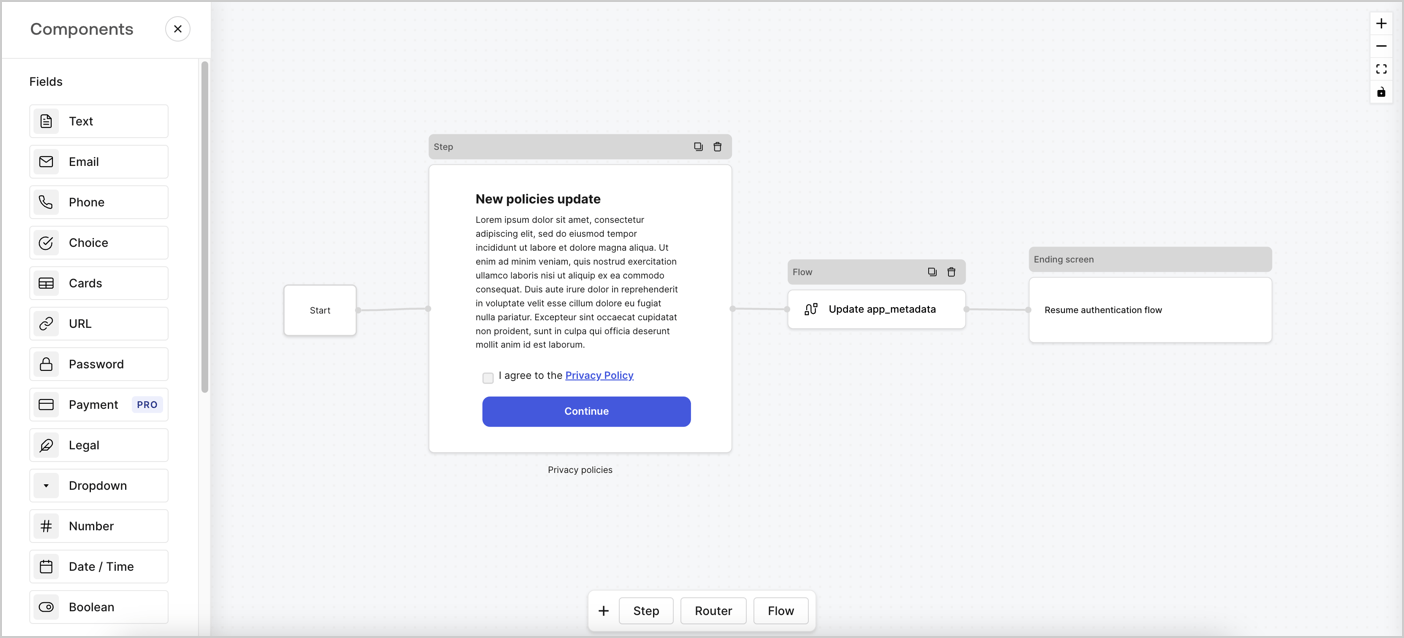
Forms for Actions allows you to create custom privacy policies flows and store the consent under the `app_metadata` object.
<Frame>
  <img src="https://mintcdn.com/docs-dev-chore-teams-api-autoupdate/ipaWcHuy4w36wNGY/docs/images/cdy7uua7fh8z/6i68dMvHDTijfRmSgN1x8Q/ad900e7d4c0fb34645921435472b8684/privavy-policy-form.png?fit=max&auto=format&n=ipaWcHuy4w36wNGY&q=85&s=0cc9c8eb4fdfdaefaf5925b254d4be45" alt="Dashboard > Actions > Forms > Privacy policy use case" data-og-width="1404" width="1404" data-og-height="638" height="638" data-path="docs/images/cdy7uua7fh8z/6i68dMvHDTijfRmSgN1x8Q/ad900e7d4c0fb34645921435472b8684/privavy-policy-form.png" data-optimize="true" data-opv="3" srcset="https://mintcdn.com/docs-dev-chore-teams-api-autoupdate/ipaWcHuy4w36wNGY/docs/images/cdy7uua7fh8z/6i68dMvHDTijfRmSgN1x8Q/ad900e7d4c0fb34645921435472b8684/privavy-policy-form.png?w=280&fit=max&auto=format&n=ipaWcHuy4w36wNGY&q=85&s=9bcbf2237ee92653afc4d4fbee8d1190 280w, https://mintcdn.com/docs-dev-chore-teams-api-autoupdate/ipaWcHuy4w36wNGY/docs/images/cdy7uua7fh8z/6i68dMvHDTijfRmSgN1x8Q/ad900e7d4c0fb34645921435472b8684/privavy-policy-form.png?w=560&fit=max&auto=format&n=ipaWcHuy4w36wNGY&q=85&s=65d886d020189f82eadd3435b18c2c8c 560w, https://mintcdn.com/docs-dev-chore-teams-api-autoupdate/ipaWcHuy4w36wNGY/docs/images/cdy7uua7fh8z/6i68dMvHDTijfRmSgN1x8Q/ad900e7d4c0fb34645921435472b8684/privavy-policy-form.png?w=840&fit=max&auto=format&n=ipaWcHuy4w36wNGY&q=85&s=bd34236d688367fed6f87bb5929ee79f 840w, https://mintcdn.com/docs-dev-chore-teams-api-autoupdate/ipaWcHuy4w36wNGY/docs/images/cdy7uua7fh8z/6i68dMvHDTijfRmSgN1x8Q/ad900e7d4c0fb34645921435472b8684/privavy-policy-form.png?w=1100&fit=max&auto=format&n=ipaWcHuy4w36wNGY&q=85&s=c73a6ad4bd21169493541911f4959b18 1100w, https://mintcdn.com/docs-dev-chore-teams-api-autoupdate/ipaWcHuy4w36wNGY/docs/images/cdy7uua7fh8z/6i68dMvHDTijfRmSgN1x8Q/ad900e7d4c0fb34645921435472b8684/privavy-policy-form.png?w=1650&fit=max&auto=format&n=ipaWcHuy4w36wNGY&q=85&s=5f121952f171a6bdb6218390ba73875b 1650w, https://mintcdn.com/docs-dev-chore-teams-api-autoupdate/ipaWcHuy4w36wNGY/docs/images/cdy7uua7fh8z/6i68dMvHDTijfRmSgN1x8Q/ad900e7d4c0fb34645921435472b8684/privavy-policy-form.png?w=2500&fit=max&auto=format&n=ipaWcHuy4w36wNGY&q=85&s=1c7a3f47bf137339663ea09800f23dc7 2500w" />
</Frame>

The sections below outline how you can create an Update Policy form using nodes and flows, along with steps for adding your form to a [Post Login](/docs/customize/actions/explore-triggers/signup-and-login-triggers/login-trigger) Action.

## Create a form from scratch

Follow these steps to create a form to gather information:

1. Open the Form editor by selecting **Auth0 Dashboard > Actions > Forms.**
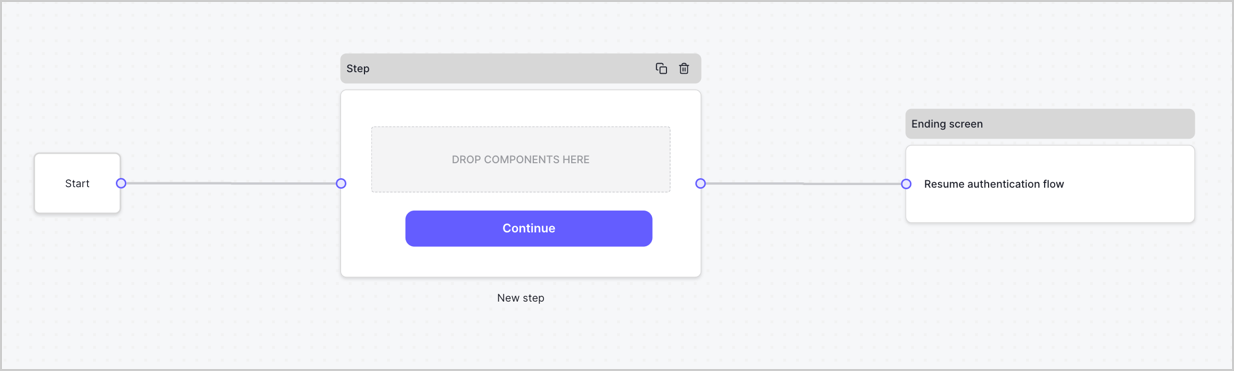
2. Select **Create Form** > **Start from scratch**.

By default, a new form contains a Start node, a Step node, and an Ending screen node.
<Frame>
  <img src="https://mintcdn.com/docs-dev-chore-teams-api-autoupdate/juScF4vDBMocuKVI/docs/images/cdy7uua7fh8z/2TZ9jSjgEcARFpULI6hz4R/a4319a1bd482f2ee5cc23100fdb2f42c/New-form-Forms-for-action-use-case.png?fit=max&auto=format&n=juScF4vDBMocuKVI&q=85&s=f09ac698c636917aa9cc7b0cf0521c41" alt="Dashboard > Forms > Use Cases > Form" data-og-width="1234" width="1234" data-og-height="371" height="371" data-path="docs/images/cdy7uua7fh8z/2TZ9jSjgEcARFpULI6hz4R/a4319a1bd482f2ee5cc23100fdb2f42c/New-form-Forms-for-action-use-case.png" data-optimize="true" data-opv="3" srcset="https://mintcdn.com/docs-dev-chore-teams-api-autoupdate/juScF4vDBMocuKVI/docs/images/cdy7uua7fh8z/2TZ9jSjgEcARFpULI6hz4R/a4319a1bd482f2ee5cc23100fdb2f42c/New-form-Forms-for-action-use-case.png?w=280&fit=max&auto=format&n=juScF4vDBMocuKVI&q=85&s=2ef30d4ac5de9631bdd869bf2b0a418d 280w, https://mintcdn.com/docs-dev-chore-teams-api-autoupdate/juScF4vDBMocuKVI/docs/images/cdy7uua7fh8z/2TZ9jSjgEcARFpULI6hz4R/a4319a1bd482f2ee5cc23100fdb2f42c/New-form-Forms-for-action-use-case.png?w=560&fit=max&auto=format&n=juScF4vDBMocuKVI&q=85&s=640a560029aabdd7733651664c0f35ee 560w, https://mintcdn.com/docs-dev-chore-teams-api-autoupdate/juScF4vDBMocuKVI/docs/images/cdy7uua7fh8z/2TZ9jSjgEcARFpULI6hz4R/a4319a1bd482f2ee5cc23100fdb2f42c/New-form-Forms-for-action-use-case.png?w=840&fit=max&auto=format&n=juScF4vDBMocuKVI&q=85&s=8420f3a23331cff1f5dc2f25a594b5f2 840w, https://mintcdn.com/docs-dev-chore-teams-api-autoupdate/juScF4vDBMocuKVI/docs/images/cdy7uua7fh8z/2TZ9jSjgEcARFpULI6hz4R/a4319a1bd482f2ee5cc23100fdb2f42c/New-form-Forms-for-action-use-case.png?w=1100&fit=max&auto=format&n=juScF4vDBMocuKVI&q=85&s=19858908642968c80cd76194cfcbd5c4 1100w, https://mintcdn.com/docs-dev-chore-teams-api-autoupdate/juScF4vDBMocuKVI/docs/images/cdy7uua7fh8z/2TZ9jSjgEcARFpULI6hz4R/a4319a1bd482f2ee5cc23100fdb2f42c/New-form-Forms-for-action-use-case.png?w=1650&fit=max&auto=format&n=juScF4vDBMocuKVI&q=85&s=dc39eded042449897dcc99a3788fe510 1650w, https://mintcdn.com/docs-dev-chore-teams-api-autoupdate/juScF4vDBMocuKVI/docs/images/cdy7uua7fh8z/2TZ9jSjgEcARFpULI6hz4R/a4319a1bd482f2ee5cc23100fdb2f42c/New-form-Forms-for-action-use-case.png?w=2500&fit=max&auto=format&n=juScF4vDBMocuKVI&q=85&s=4015fd5fd3e2d9678ce71a3151c8be47 2500w" />
</Frame>

### Configure the Step node

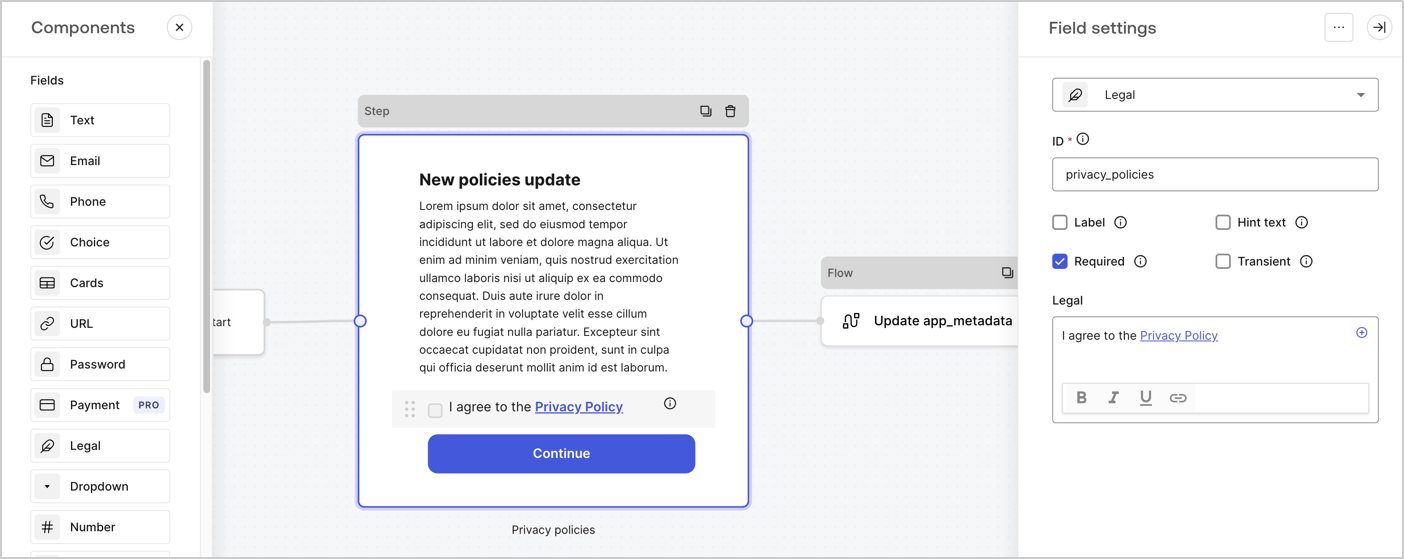
The Step node is the graphical interface visible to users. Add [Fields](/docs/customize/forms/nodes-and-components) to the Step node to collect the new agreement acceptance value by following these steps:

1. Drag a **Rich text** field from the **Components menu** into the **Step** node.

   * **Rich text**: Enter a description of your privacy policies updates.
   * Select **Save**.
2. Drag a **Legal** field into the **Step** node.

   * **ID**: Enter `privacy_policies`.
   * **Required**: Enable the checkbox.
   * **Legal**: Enter `I agree to the Privacy Policy`.
   * Select **Save**.
3. Select **Publish** to save.
<Frame>
  <img src="https://mintcdn.com/docs-dev-chore-teams-api-autoupdate/ec-TojP_9ferUSBz/docs/images/cdy7uua7fh8z/59zFFjQjAnjogkc2QGIqqJ/0ad66b1b636544122aa4e65968b76c2c/privacy-policy-step-node.png?fit=max&auto=format&n=ec-TojP_9ferUSBz&q=85&s=9b46cbe09e0f9ce4bc45968d73493035" alt="Dashboard > Actions > Forms > Use case privacy policy step node" data-og-width="1404" width="1404" data-og-height="559" height="559" data-path="docs/images/cdy7uua7fh8z/59zFFjQjAnjogkc2QGIqqJ/0ad66b1b636544122aa4e65968b76c2c/privacy-policy-step-node.png" data-optimize="true" data-opv="3" srcset="https://mintcdn.com/docs-dev-chore-teams-api-autoupdate/ec-TojP_9ferUSBz/docs/images/cdy7uua7fh8z/59zFFjQjAnjogkc2QGIqqJ/0ad66b1b636544122aa4e65968b76c2c/privacy-policy-step-node.png?w=280&fit=max&auto=format&n=ec-TojP_9ferUSBz&q=85&s=cd7115a27737dd0844a35ee1350670e5 280w, https://mintcdn.com/docs-dev-chore-teams-api-autoupdate/ec-TojP_9ferUSBz/docs/images/cdy7uua7fh8z/59zFFjQjAnjogkc2QGIqqJ/0ad66b1b636544122aa4e65968b76c2c/privacy-policy-step-node.png?w=560&fit=max&auto=format&n=ec-TojP_9ferUSBz&q=85&s=85300f4449723b816adff15eccf5d794 560w, https://mintcdn.com/docs-dev-chore-teams-api-autoupdate/ec-TojP_9ferUSBz/docs/images/cdy7uua7fh8z/59zFFjQjAnjogkc2QGIqqJ/0ad66b1b636544122aa4e65968b76c2c/privacy-policy-step-node.png?w=840&fit=max&auto=format&n=ec-TojP_9ferUSBz&q=85&s=fdee330310875858ddfdd2c335536a6a 840w, https://mintcdn.com/docs-dev-chore-teams-api-autoupdate/ec-TojP_9ferUSBz/docs/images/cdy7uua7fh8z/59zFFjQjAnjogkc2QGIqqJ/0ad66b1b636544122aa4e65968b76c2c/privacy-policy-step-node.png?w=1100&fit=max&auto=format&n=ec-TojP_9ferUSBz&q=85&s=744913bd565c051fb9cbd7ddc5fffea5 1100w, https://mintcdn.com/docs-dev-chore-teams-api-autoupdate/ec-TojP_9ferUSBz/docs/images/cdy7uua7fh8z/59zFFjQjAnjogkc2QGIqqJ/0ad66b1b636544122aa4e65968b76c2c/privacy-policy-step-node.png?w=1650&fit=max&auto=format&n=ec-TojP_9ferUSBz&q=85&s=dac1873f5a6be8d46314fb92cfcd0800 1650w, https://mintcdn.com/docs-dev-chore-teams-api-autoupdate/ec-TojP_9ferUSBz/docs/images/cdy7uua7fh8z/59zFFjQjAnjogkc2QGIqqJ/0ad66b1b636544122aa4e65968b76c2c/privacy-policy-step-node.png?w=2500&fit=max&auto=format&n=ec-TojP_9ferUSBz&q=85&s=1b87208d6b336e50cb50fe7bd3b51486 2500w" />
</Frame>

### Configure the Flow node

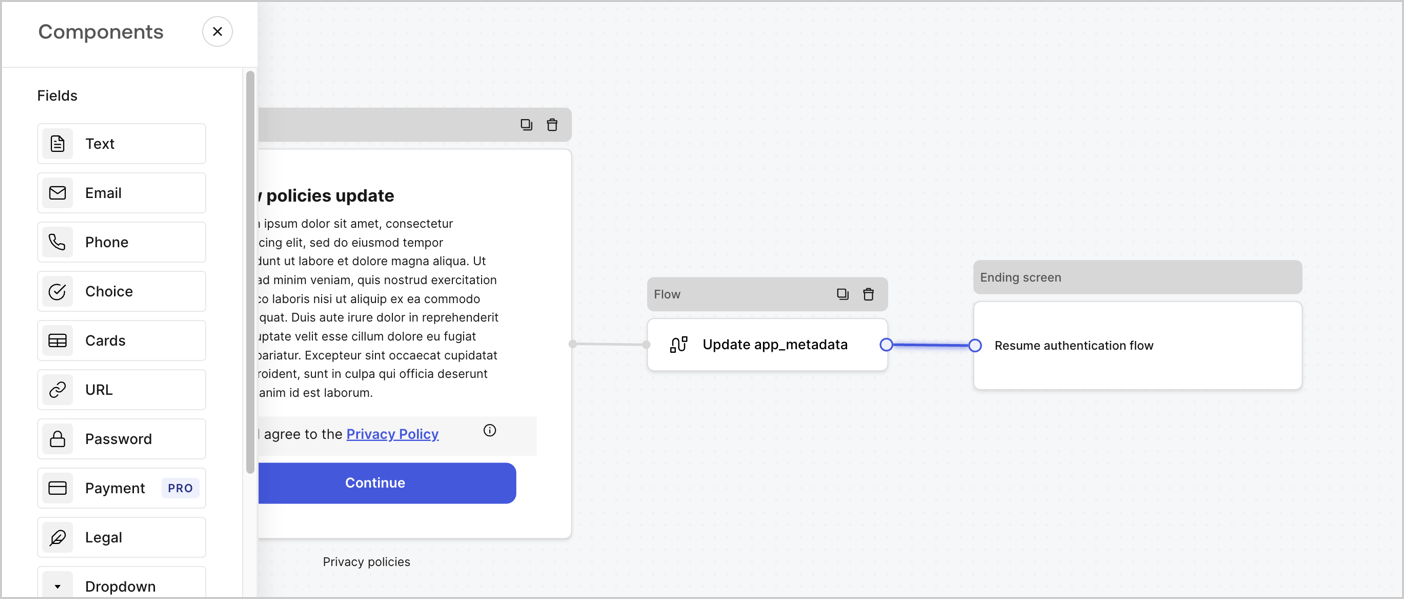
Add a **Flow** node after the **Step** node to update the `app_metadata` and resume the authentication flow by following these steps:

1. Select **Flow** from the bottom of the Form editor.
2. Remove the existing link between the **Step** and **Ending Screen** nodes.
3. Select the new **Flow** > **Click to add a flow** > **Create a new flow.**

   * Enter `Update app_metadata` in the **Name** field.
   * Select **Create**.
   * Select **Save**.
4. Link the **Flow** node to the **Step** and **Ending Screen** nodes as pictured below.
5. Select **Publish** to save.
<Frame>
  <img src="https://mintcdn.com/docs-dev-chore-teams-api-autoupdate/ipaWcHuy4w36wNGY/docs/images/cdy7uua7fh8z/6YIkzm7SrpM9LW76AXuRzh/353c518fe82bbaa440836da1d83596d6/link-policies.png?fit=max&auto=format&n=ipaWcHuy4w36wNGY&q=85&s=95bfd3274c380e555a178f46bda505b8" alt="Dashboard > Actions > Forms > Form" data-og-width="1404" width="1404" data-og-height="599" height="599" data-path="docs/images/cdy7uua7fh8z/6YIkzm7SrpM9LW76AXuRzh/353c518fe82bbaa440836da1d83596d6/link-policies.png" data-optimize="true" data-opv="3" srcset="https://mintcdn.com/docs-dev-chore-teams-api-autoupdate/ipaWcHuy4w36wNGY/docs/images/cdy7uua7fh8z/6YIkzm7SrpM9LW76AXuRzh/353c518fe82bbaa440836da1d83596d6/link-policies.png?w=280&fit=max&auto=format&n=ipaWcHuy4w36wNGY&q=85&s=42b5932e57d177f0d07b4cd1a297cfdf 280w, https://mintcdn.com/docs-dev-chore-teams-api-autoupdate/ipaWcHuy4w36wNGY/docs/images/cdy7uua7fh8z/6YIkzm7SrpM9LW76AXuRzh/353c518fe82bbaa440836da1d83596d6/link-policies.png?w=560&fit=max&auto=format&n=ipaWcHuy4w36wNGY&q=85&s=f1d2626e0014cd84bc77b76bd55ac004 560w, https://mintcdn.com/docs-dev-chore-teams-api-autoupdate/ipaWcHuy4w36wNGY/docs/images/cdy7uua7fh8z/6YIkzm7SrpM9LW76AXuRzh/353c518fe82bbaa440836da1d83596d6/link-policies.png?w=840&fit=max&auto=format&n=ipaWcHuy4w36wNGY&q=85&s=568adb4fe26af8fa60ab33909ea42bcd 840w, https://mintcdn.com/docs-dev-chore-teams-api-autoupdate/ipaWcHuy4w36wNGY/docs/images/cdy7uua7fh8z/6YIkzm7SrpM9LW76AXuRzh/353c518fe82bbaa440836da1d83596d6/link-policies.png?w=1100&fit=max&auto=format&n=ipaWcHuy4w36wNGY&q=85&s=1ef5f75cc49cb8be4253638da57986fb 1100w, https://mintcdn.com/docs-dev-chore-teams-api-autoupdate/ipaWcHuy4w36wNGY/docs/images/cdy7uua7fh8z/6YIkzm7SrpM9LW76AXuRzh/353c518fe82bbaa440836da1d83596d6/link-policies.png?w=1650&fit=max&auto=format&n=ipaWcHuy4w36wNGY&q=85&s=7c3ecc3679df951c645dee02c16da8d9 1650w, https://mintcdn.com/docs-dev-chore-teams-api-autoupdate/ipaWcHuy4w36wNGY/docs/images/cdy7uua7fh8z/6YIkzm7SrpM9LW76AXuRzh/353c518fe82bbaa440836da1d83596d6/link-policies.png?w=2500&fit=max&auto=format&n=ipaWcHuy4w36wNGY&q=85&s=43c414abf5eabc9b1c051f564b0cd5d8 2500w" />
</Frame>

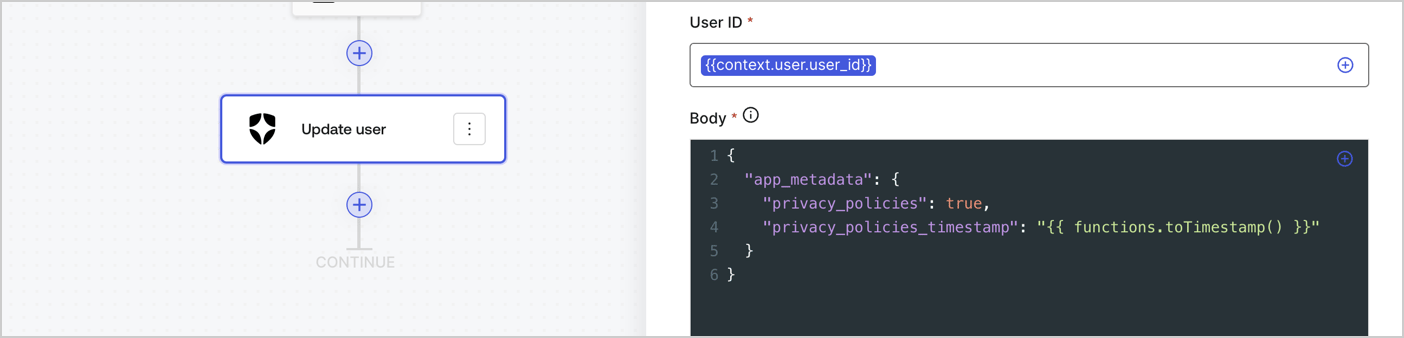
Add an Auth0 Update user action to the flow by following these steps:

1. Select the **Flow** **Update app\_metadata** > **Edit flow** to open the Flow editor in a new tab.
2. Below the StartAction, select the **+** icon to add an **Update user** action. Complete the fields below, then select **Save** to continue.

   * **Connection**: Select from the dropdown the Vault connection to your M2M application.

   * **User ID**: Enter `{{context.user.user_id}}`.

   * **Body**: Copy and paste the following code to update the app\_metadata with the privacy\_policies and privacy\_policies\_timestamp properties.

     ```text lines theme={null}
     {
       "app_metadata": {
         "privacy_policies": true,
         "privacy_policies_timestamp": "{{ functions.toTimestamp() }}"
       }
     }
     ```

   * Select **Save**.
3. Select **Publish** to save.
<Frame>
  <img src="https://mintcdn.com/docs-dev-chore-teams-api-autoupdate/SxIEyDjaLqyL-KLP/docs/images/cdy7uua7fh8z/CvMNIwWrOUwaFW4X3G28p/1fb70ae57a20749d9ffaaba8dc0b7e26/update-user-privacy.png?fit=max&auto=format&n=SxIEyDjaLqyL-KLP&q=85&s=6c27e0c527d6ec63b3f35304343aa151" alt="Dashboard > Actions > Forms > User case privacy policy code" data-og-width="1404" width="1404" data-og-height="338" height="338" data-path="docs/images/cdy7uua7fh8z/CvMNIwWrOUwaFW4X3G28p/1fb70ae57a20749d9ffaaba8dc0b7e26/update-user-privacy.png" data-optimize="true" data-opv="3" srcset="https://mintcdn.com/docs-dev-chore-teams-api-autoupdate/SxIEyDjaLqyL-KLP/docs/images/cdy7uua7fh8z/CvMNIwWrOUwaFW4X3G28p/1fb70ae57a20749d9ffaaba8dc0b7e26/update-user-privacy.png?w=280&fit=max&auto=format&n=SxIEyDjaLqyL-KLP&q=85&s=dd976d750f0c5e59205c2074ae34de5a 280w, https://mintcdn.com/docs-dev-chore-teams-api-autoupdate/SxIEyDjaLqyL-KLP/docs/images/cdy7uua7fh8z/CvMNIwWrOUwaFW4X3G28p/1fb70ae57a20749d9ffaaba8dc0b7e26/update-user-privacy.png?w=560&fit=max&auto=format&n=SxIEyDjaLqyL-KLP&q=85&s=671970ade6db130804d661da2d010944 560w, https://mintcdn.com/docs-dev-chore-teams-api-autoupdate/SxIEyDjaLqyL-KLP/docs/images/cdy7uua7fh8z/CvMNIwWrOUwaFW4X3G28p/1fb70ae57a20749d9ffaaba8dc0b7e26/update-user-privacy.png?w=840&fit=max&auto=format&n=SxIEyDjaLqyL-KLP&q=85&s=e9ef5b77e85133d2277636cd60f2a793 840w, https://mintcdn.com/docs-dev-chore-teams-api-autoupdate/SxIEyDjaLqyL-KLP/docs/images/cdy7uua7fh8z/CvMNIwWrOUwaFW4X3G28p/1fb70ae57a20749d9ffaaba8dc0b7e26/update-user-privacy.png?w=1100&fit=max&auto=format&n=SxIEyDjaLqyL-KLP&q=85&s=61e4c5f18ba4344a3714ff0b8350cf7c 1100w, https://mintcdn.com/docs-dev-chore-teams-api-autoupdate/SxIEyDjaLqyL-KLP/docs/images/cdy7uua7fh8z/CvMNIwWrOUwaFW4X3G28p/1fb70ae57a20749d9ffaaba8dc0b7e26/update-user-privacy.png?w=1650&fit=max&auto=format&n=SxIEyDjaLqyL-KLP&q=85&s=b528a8ded460f3f13c5ecc6caea83fd6 1650w, https://mintcdn.com/docs-dev-chore-teams-api-autoupdate/SxIEyDjaLqyL-KLP/docs/images/cdy7uua7fh8z/CvMNIwWrOUwaFW4X3G28p/1fb70ae57a20749d9ffaaba8dc0b7e26/update-user-privacy.png?w=2500&fit=max&auto=format&n=SxIEyDjaLqyL-KLP&q=85&s=f43a31d6f679fddbc757da53d8968968 2500w" />
</Frame>

<Callout icon="file-lines" color="#0EA5E9" iconType="regular">
  The flow **Update app\_metadata** adds a `privacy_policies true` value to the app`_metadata` object and also generates a timestamp with a [helper function.](/docs/customize/forms/variables)
</Callout>

## Retrieve the form render code

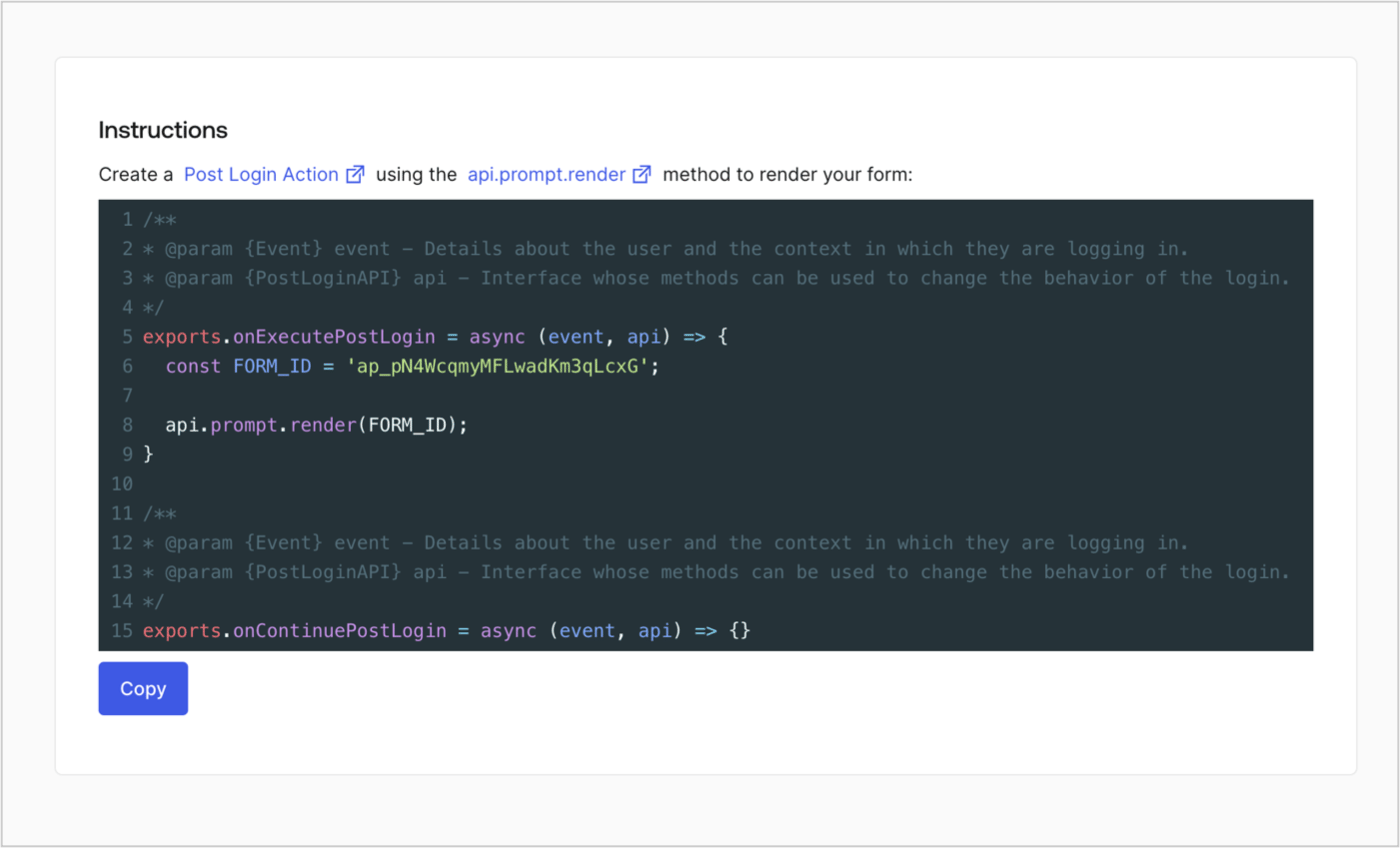
Retrieve your form render code to visually render the form with a custom Post Login Action by following these steps:

* From the Form editor, select **`<> Render`**.
* Select **Copy**.
<Frame>
  <img src="https://mintcdn.com/docs-dev-chore-teams-api-autoupdate/uVSZjigrCWcf9TdP/docs/images/cdy7uua7fh8z/2EIUzc539sq9lwoTKbjoJv/496a864c0fc44a782c9cadca119dbfb0/embed.png?fit=max&auto=format&n=uVSZjigrCWcf9TdP&q=85&s=d5a4b0c7dc67b76c433af74eea985a54" alt="Dashboard > Actions > Forms > Form > Embed" data-og-width="1400" width="1400" data-og-height="848" height="848" data-path="docs/images/cdy7uua7fh8z/2EIUzc539sq9lwoTKbjoJv/496a864c0fc44a782c9cadca119dbfb0/embed.png" data-optimize="true" data-opv="3" srcset="https://mintcdn.com/docs-dev-chore-teams-api-autoupdate/uVSZjigrCWcf9TdP/docs/images/cdy7uua7fh8z/2EIUzc539sq9lwoTKbjoJv/496a864c0fc44a782c9cadca119dbfb0/embed.png?w=280&fit=max&auto=format&n=uVSZjigrCWcf9TdP&q=85&s=f54922075f509e606b8450be7cbe92fd 280w, https://mintcdn.com/docs-dev-chore-teams-api-autoupdate/uVSZjigrCWcf9TdP/docs/images/cdy7uua7fh8z/2EIUzc539sq9lwoTKbjoJv/496a864c0fc44a782c9cadca119dbfb0/embed.png?w=560&fit=max&auto=format&n=uVSZjigrCWcf9TdP&q=85&s=e9d2d80bc69d39f2fae531fe59b278e6 560w, https://mintcdn.com/docs-dev-chore-teams-api-autoupdate/uVSZjigrCWcf9TdP/docs/images/cdy7uua7fh8z/2EIUzc539sq9lwoTKbjoJv/496a864c0fc44a782c9cadca119dbfb0/embed.png?w=840&fit=max&auto=format&n=uVSZjigrCWcf9TdP&q=85&s=121219c9d80402d183af3ad3fbbb3360 840w, https://mintcdn.com/docs-dev-chore-teams-api-autoupdate/uVSZjigrCWcf9TdP/docs/images/cdy7uua7fh8z/2EIUzc539sq9lwoTKbjoJv/496a864c0fc44a782c9cadca119dbfb0/embed.png?w=1100&fit=max&auto=format&n=uVSZjigrCWcf9TdP&q=85&s=739edc20c1023daa0fb831813e629ef6 1100w, https://mintcdn.com/docs-dev-chore-teams-api-autoupdate/uVSZjigrCWcf9TdP/docs/images/cdy7uua7fh8z/2EIUzc539sq9lwoTKbjoJv/496a864c0fc44a782c9cadca119dbfb0/embed.png?w=1650&fit=max&auto=format&n=uVSZjigrCWcf9TdP&q=85&s=7d99a7fad4bcf98f4faa6fbc0b322a4f 1650w, https://mintcdn.com/docs-dev-chore-teams-api-autoupdate/uVSZjigrCWcf9TdP/docs/images/cdy7uua7fh8z/2EIUzc539sq9lwoTKbjoJv/496a864c0fc44a782c9cadca119dbfb0/embed.png?w=2500&fit=max&auto=format&n=uVSZjigrCWcf9TdP&q=85&s=c65cf73b1f97e993eda320dea1c6da55 2500w" />
</Frame>

## Create a Post Login Action

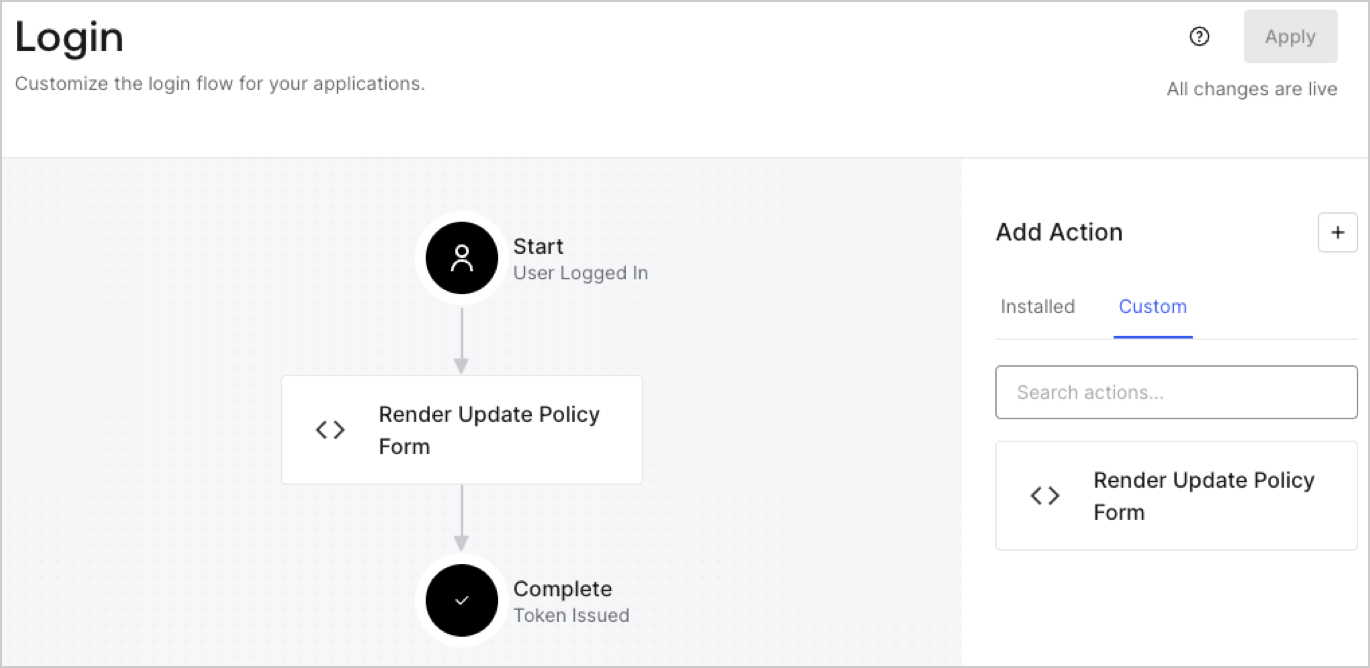
Create a post-login Action to render your form by following these steps:

1. Navigate to **Auth0 Dashboard > Actions > Flows > Login.**
2. Select the **+** icon and Select **Build from scratch**:

   * **Name**: Enter `Render Update Policy Form`.
   * **Trigger**: Select `Login / Post Login`.
   * **Runtime**: Select the recommended version.
3. Select **Create**.

To configure the post-login Action:

1. Delete the existing code from the Code editor.
2. Paste the form render code into the Code editor.
3. Edit the code to define the conditional logic that will render the form.

   ```javascript lines theme={null}
   /**
   * @param {Event} event - Details about the user and the context in which they are logging in.
   * @param {PostLoginAPI} api - Interface whose methods can be used to change the behavior of the login.
   */
   exports.onExecutePostLogin = async (event, api) => {
     const FORM_ID = 'REPLACE_WITH_YOUR_FORM_ID';

     if (event.user.app_metadata.privacy_policies !== true) {
       api.prompt.render(FORM_ID);
     }
   }

   exports.onContinuePostLogin = async (event, api) => { }
   ```

   <Callout icon="file-lines" color="#0EA5E9" iconType="regular">
     The example code above will render the form when a user is missing the app metadata `privacy_policies` property.
   </Callout>
4. Select **Deploy.**
5. Drag and Drop the **Render Update Policy Form** Action to the **Login** flow.
   <Frame>
     <img src="https://mintcdn.com/docs-dev-chore-teams-api-autoupdate/OOmNEjFAZCEhSzGe/docs/images/cdy7uua7fh8z/5TOwDgevZsBqd7yZynUYWU/41ca909dc3007aed4f40ff794a05efa5/postlogin.png?fit=max&auto=format&n=OOmNEjFAZCEhSzGe&q=85&s=119374edfc503f9c6923e679374e7611" alt="Dashboard > Forms > Use Case > Render update policy form login action" data-og-width="1370" width="1370" data-og-height="668" height="668" data-path="docs/images/cdy7uua7fh8z/5TOwDgevZsBqd7yZynUYWU/41ca909dc3007aed4f40ff794a05efa5/postlogin.png" data-optimize="true" data-opv="3" srcset="https://mintcdn.com/docs-dev-chore-teams-api-autoupdate/OOmNEjFAZCEhSzGe/docs/images/cdy7uua7fh8z/5TOwDgevZsBqd7yZynUYWU/41ca909dc3007aed4f40ff794a05efa5/postlogin.png?w=280&fit=max&auto=format&n=OOmNEjFAZCEhSzGe&q=85&s=1b195a7d901bd653edd75d6b689082c9 280w, https://mintcdn.com/docs-dev-chore-teams-api-autoupdate/OOmNEjFAZCEhSzGe/docs/images/cdy7uua7fh8z/5TOwDgevZsBqd7yZynUYWU/41ca909dc3007aed4f40ff794a05efa5/postlogin.png?w=560&fit=max&auto=format&n=OOmNEjFAZCEhSzGe&q=85&s=16a59af4c4771ab327ba2a88def54cd8 560w, https://mintcdn.com/docs-dev-chore-teams-api-autoupdate/OOmNEjFAZCEhSzGe/docs/images/cdy7uua7fh8z/5TOwDgevZsBqd7yZynUYWU/41ca909dc3007aed4f40ff794a05efa5/postlogin.png?w=840&fit=max&auto=format&n=OOmNEjFAZCEhSzGe&q=85&s=2c82148af04631a22a30712c609fe90e 840w, https://mintcdn.com/docs-dev-chore-teams-api-autoupdate/OOmNEjFAZCEhSzGe/docs/images/cdy7uua7fh8z/5TOwDgevZsBqd7yZynUYWU/41ca909dc3007aed4f40ff794a05efa5/postlogin.png?w=1100&fit=max&auto=format&n=OOmNEjFAZCEhSzGe&q=85&s=2a8147684499c389d225b85751a0a6d7 1100w, https://mintcdn.com/docs-dev-chore-teams-api-autoupdate/OOmNEjFAZCEhSzGe/docs/images/cdy7uua7fh8z/5TOwDgevZsBqd7yZynUYWU/41ca909dc3007aed4f40ff794a05efa5/postlogin.png?w=1650&fit=max&auto=format&n=OOmNEjFAZCEhSzGe&q=85&s=ec82e0b99ecda74b60594deb875d8fef 1650w, https://mintcdn.com/docs-dev-chore-teams-api-autoupdate/OOmNEjFAZCEhSzGe/docs/images/cdy7uua7fh8z/5TOwDgevZsBqd7yZynUYWU/41ca909dc3007aed4f40ff794a05efa5/postlogin.png?w=2500&fit=max&auto=format&n=OOmNEjFAZCEhSzGe&q=85&s=848b21a4b4efa5e4fb95b5fb3ebe05eb 2500w" />
   </Frame>
6. Select **Apply.**

### Test implementation

Test the implementation by following these steps:

1. Log in with an existing user whose app`_metadata` attribute `privacy_policies` does not have a value.
2. The post-login Action in the Login flow will render the form and prompt for acceptance.
3. Select **Auth0 Dashboard > User Management > Users,** locate the user and verify that the `app_metadata` attribute `privacy_policies` contains a `true` value and a timestamp.
